"The only way to be truly satisfied, is to do what you believe is great work. And the only way to do great work is to love what you do." Steve Jobs
Once "inking" gets into your veins you will never be able to live without it. Frank J. Garcia

Showing posts with label Q1. Show all posts

Wednesday, November 14, 2007

Get the Samsung Q1 for just $579!

This is a very good deal found by JKonTheRun!

If you've been holding out to get a Samsung Q1 UMPC at 50% off, today's the day for you. Hop over to Yahoo! Shopping Woot, which is a co-branded sellout service between both Yahoo! and woot. If you hurry, you should see the original Samsung Q1 for $579 plus $5 shipping since that's the deal of the day. (That's an understatement!) These are refurbished units and I want to caution you about one inconsistency that I see. If you click the details of the listing, the product ID indicates this is a model Q1b. However, in the specifics of the product, it shows an Intel 900 MHz Celeron CPU, which tells me this is the original Q1. Be sure you're getting the product that you want here... personally, I think it's the original Q1.

Little by little we are going to see the UMPC prices to go down to that sweet spot that we all want.

Wednesday, August 08, 2007

Parts for your Q1

 Looking for Q1 CDs, for the 4 way button, case, battery and other parts. Check this page:

Original Samsung Parts & Accessories and Products

[Thanks todoUMPC forum for this tip]

Technorati Tags:

Monday, August 06, 2007

What useful a UMPC can be

 Here is what a proud Q1 Owner wrote at Origami Project Forum:

I'm not huge on writing on these boards but this topic is near and dear to me.... I bought a Q1 last November off of Woot! Quite honestly I had never seen anything like it before and never heard the acronym UMPC but it was just so cool looking and I couldn't help to think of the possibilities of a unit that small with a full blown version of XP on it (USB and wireless... limitless right?).... I consider myself a techno jock and always have the new and cool things but somehow these had slipped by me (riducously poor advertising for these units in my opinion, I mean c'mon you could have a 15 second commercial on The Weather Channel with no audio in the middle of the night that would sell more units than have been sold to date for all manufacturers...) and I've had a million techno gadgets that I thought were going to change my life but I mean when I say the Q1 has changed my life.... I use it in all aspects of my day.... I drive to work with it hooked up in my car, check my emails (USB modem and a VPN connection) watch a little ESPN (Slingbox and a tape drive audio connection to my Q1 to broadcast from my stereo speakers) and perhaps a hand of poker or two (pokerpages.com). I get to work and all day long I use MS One Note (the single most important piece of software ever created for UMPC's again horribly under-advertised... what up Microsoft?). This program helps me take notes at meetings, record any service calls I get (which is a bunch) send my hand written notes to my boss in a word doc and man is it cool when I hook my Q1 up to a projector and record a groups thoughts and ideas as they are coming out of their heads on the big screen. Thank god all those yellow paper tablets and post-it notes are out of my life!!! Any chance I get I'm checking my google reader, gotta check out the newest jkontherun, ultramobilepctips, gottabemobile, engadgetmobile and gizmodo among many others.... trying to stay up to date.... leaving work I am hooking up my USB GPS for directions to where ever the hang out is for the evening... usually I get there and am hooking my Q1 to my Western Digital 120 Gig USB HD and a set of 3.5 mm speakers I keep in the back seat of my car for emergencies so we can listen to the battery of music I have. Drive home listening to WMP11 and watching some sweet visuals from G-force (trial version is great, full version... awesome). Get home surf for hours from my couch or in the backyard. Go to bed and do it again the next day. Its been 10 months and I'm only using the unit more and more.... I have upgraded it to 2 gigs of ram (which is key) and bought pretty much every piece of outside equipment you can think of... (best item is the Samsung carrying case and keyboard which essentially makes it a full blown laptop). I just recently upgraded to Vista Ultimate and the unit is a monster now...  I was nervous because I heard a lot of complaints about Vista but my unit runs it like a champ, faster than with XP and the tablet features for Vista are just incredible.... (once some computer ninja writes a driver for Aero with my 915 Intel chipset my life will be complete) so I can definitely see why this has made the list and my boss just got a Q1U with Vista Home on it and it did seem like less a unit (although the screen itself is far superior, wonder if I can upgrade mine?) I wouldn't give up my Q1 for anything currently on the market... I'm waiting for something to knock it off its pedestal and thought the new Samsung would be it but now I'm convinced mines superior... Maybe I'll have to wait for the Q1Ultra Ultra Ultra Mobile PC... until then my Q1 is the best gadget I've ever purchased and I have no desire to replace it with any of the newer units I've seen hit the market... Way to go Samsung!

Nothing left to say. I also love my Q1 and so far I have not seen anything better in the market. Seriously and Honestly.

Technorati Tags:

Friday, August 03, 2007

Samsung Unveils Ultra Mobile PC

Where this guy has been all this time! A year and a half later he found the UMPCs!!!!!!!!!!!! The title of his article attracted me because I though that he was talking about a new UMPC from Samsung that I did not know, but I was wrong, he was not talking about anything new, he was not talking about the Q1U, he was talking about the Original Q1 with Celeron Processor that really was unveiled by Samsung more than 18 months ago!

According to Samung, this is by far the first and only device incorporating the UMPC platform developed by Microsoft and Intel, as part of the Origami project.

And of top of misinforming all the readers with things like the above quote, he even misspelled Samsung. I'll tried to find a way to leave a comment on that site or his personal blog with my link on it to give him a little bit more information about UMPCs.

Technorati Tags:

Wednesday, August 01, 2007

Top 10 Tablet PCs of July 2007

TabletPCReviews has included the Samsung Q1 within the top ten Tablet PCs of July 2007.  

The Samsung Q1 is making some kind of come back returning to the list for the first time this year. Maybe it's due to all the improvements that have been made to this sleek UMPC. The Samsung Q1 features an Intel Celeron processor, 512MB of RAM, 40GB hard drive, and a 7-inch widescreen. The Q1 also runs Windows Tablet PC OS.

To me it is very interesting that they did not selected the newest Q1U but the old Q1 with Celeron Processor. The Q1 with Celeron has the same performance than the Q1P and cost a lot less. The only difference between the two is about 10 to 20 minutes more of battery life in the Q1P. I have been using the Q1 for around 10 months and as of today I have not found a better companion. I need more performance and I need more battery life, no question about it. Have I thought about replacing the Q1? Yes, but it's not the time yet. The second generation of UMPC does not give me the performance that I need and it's worse than what I have in my Q1. They have a better battery life but no all of them and those with a better one only have 1 hour more of life, something that I get easily with a extended battery. And now with Vista and the HID Driver I even do not miss any more the mouse of my eo v7110 which was a big point in the past for me. So here I'm, a happy camper with my Q1.

Technorati Tags:

Tuesday, June 19, 2007

HD 720p movie in a Q1

I was asked recently if a HD 720p movie would play in a Q1.The answer is in this short video.


Technorati Tags:

Thursday, June 07, 2007

A heavy used Q1

I received today a very curious email from a UMPC fan that live in Europe and has been reading me for a while:

Hello Franck,

Dunno if you remember me, I'm Fred from Origaminfo.com.
Because I could not find time anymore to post news and articles on my site, I preferred to close it instead of leaving it running with old news...

It's now more than one year that I have my Samsung Q1 (upgraded to 1Gb) and I use it as my primary home computer every day, at least 2 hours daily:

- The left part of the screen has a long vertical scratch because of the scrollbars of the windows. I'm pretty happy to have installed GeckoTips to scroll the pages with Firefox Open-mouthed

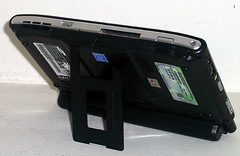
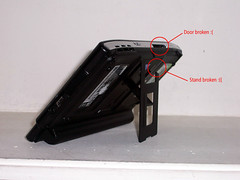
- The stand in the back of the Q1 broke... I used to handle the Q1 with my left hand, putting my left thumb under the stand, but one sad day, it broke.

- The small door on the top of the Q1, protecting the CompactFlash port broke too. I use it often with a PCMCIA to CF adaptor to use my Edge PCMCIA card to connect to the Internet from anywhere (flat rate, true unlimited data access). But finally, this killed the small door.

- I lost the little round thing that close the hole of the antenna (that we don't have in US and Europe).

- and worst of all, the battery was almost dead, allowing me only 20mn of power... and believe me, it's short Smile

I bought an extended battery (see pictures).

It reminds me the Mugen Power but it's not this brand. It's a DLH battery.

It's a bit heavy and it's given for 7 to 8 hours of power... As of today, I could use it at least 6 hours without running out of power, which is more than enough for me Open-mouthed I haven't tried yet to run out of power and see how long it can last.

I bought it about $290 USD... kind of expensive.

If you have questions, ask me

Smile

Cya,

F.

And these pictures attached.

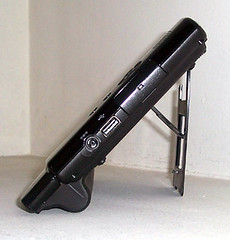
100_4665 100_4664 100_4663
100_4662 100_4661  


The 9 cell battery in the above picture is not made by Mugen Power but by Samsung and it was bought from here. What can I say. Samsung has proven to made high quality UMPCs. Just check the 3rd picture. Can you believe that this device has survived a year with this guy using it -should I say abusing it? -as his main PC every day up to the point that a battery already died on him? No doubt about it, that's what I call quality.

Technorati Tags:

Wednesday, June 06, 2007

Why?

When the time to write the story of UMPCs comes Hugo Ortega will have a place in that book. His videos about why he selected the Samsung Q1 as his primary and main machine are just a classic. Modern Don QuijoteYou wont find anything closer to the image of a modern Don Quixote than the photo of him holding his Samsung Organizer in his visit to the far land of China.

For me it was a logical move when Hugo switched his eo v7110 for the Samsung Q1, for a powerful user a powerful machine. And if that was understandable, I'm having a really hard time trying to comprehend why he changed his Q1 for a OQO 02.

No, I have not used a OQO 02 but that does not change anything.
You are right there is not way to compare both devices, this is why I asked Hugo what made him to change the full size keyboard of the Q1 that allowed him to post from anywhere at a higher speed  for that small OQO keyboard where you can't type more than 30 wpm, the comfortable 7" touch screen where you can type using anything including fingers for that small size digitizer where you need to carry a special pen. A lot faster and powerful processor for a very hot and slow VIA. A machine using Vista for a machine using XP knowing that Vista recognition is better.


I would like him to explain with his magic, why he is using now the OQO?

Facts:

  • VIA Processor is slower than a Celeron processor.
  • VIA devices run a a higher temperature than Samsung Q1s.(°)
  • OQO 02 is noisy compare to a Q1, the noise is produced by the processor fan, the same noise can be found in Amtek T700 and T770.(°)
  • The integrated keyboard is slower than the full size keyboard included in the Samsung organizer.
  • The OQO 02 does not include a digital pen and even if it is included there is not any bay or pen holder in the machine body to keep the pen. The digital pen needs to be carried as a separated item.
  • Vista Recognizer is a lot better than XP recognizer.Hugo's OQO uses XP Tablet PC 2005 Edition.

(°)- Your can read about OQO noise, high temperature and absence of a pen holder here. I'm using this review as reference because it was written by somebody who loves his OQO, no by one of those "specialized magazine tech writers".

Technorati Tags: , ,

One Voice's MCC running in a Q1

One Voice's Media Center Communicator running on the Samsung Q1 UMPC. No voice training!


I'm really impressed!

Tuesday, June 05, 2007

Vikram takes his Q1 on vacation

Vikram Madan's Blog is one of these blogs that I have in my RSS Feed. And today his has just posted a few minutes ago an article that I would recommend to anyone planning the summer vacation.

My Q1 UMPC has pretty much become my defacto travel machine, especially for personal vacations. Gone are the days of lugging a full-sized laptop around


Technorati Tags:

Monday, May 28, 2007

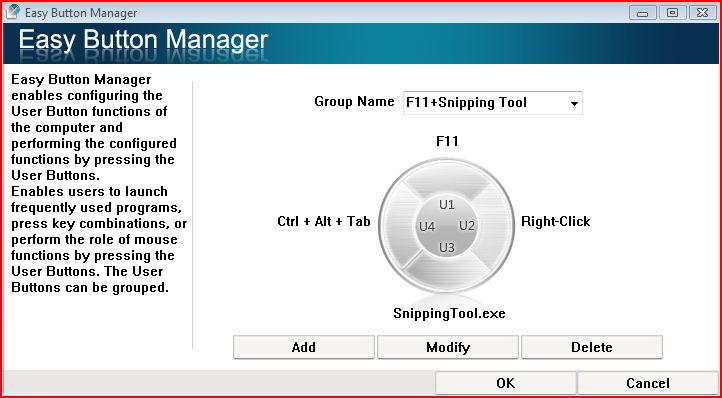
what's your U keys configuration?

Capture

The above picture shows my favorite U Keys configuration. What's your?

Wednesday, May 23, 2007

Is the pricey upgrade worth it when using a Q1 with a hard drive?

I think so and more when you are using a very slow HDD. More memory means less HDD access for the majority of the heavy programs. Where I have seen an evident increase in performance?

1- Browsing the web. When I scroll pages the screen is refreshed a lot faster.
2- Start Menu Opens faster.
3- Outlook works faster refreshing the email preview screen. The inking tool works faster too. I have an image in my signature and the process of inserting the signature is quicker.
3- File explorer refresh folder contest faster. Thumbnail views are refreshed faster.
4- Windows More Maker responds better.
5- Editing pictures is now a lot faster too.

$173 seems to me a fair price taking in consideration how this easy to do upgrade helps with performance. Of course I would have liked to pay less but... I do not regret this buy.

Tuesday, May 22, 2007

Chippy, here is the second test

Even when I said in the video that it takes 8 seconds after analyzing it a little bit it I can say that it's around 7 seconds instead 8 seconds.


Video: Control Panel Test 2

Monday, May 21, 2007

How long takes to open the Control Panel

11? 6? 5 Seconds?


Video: Control Panel Test


Update: This result is the best result, and like Chippy pointed cache helped. But... I repeated this tests many times including tests after a reboot and the worse results right after rebooting where no cache is involved the test took between 5 to 6 seconds. has the 2 GB of RAM helped in this test? Probably, but I ran this test with 1 GB of RAM and I could not measure any significant difference.

The Original Q1 supports 2 GB of RAM!

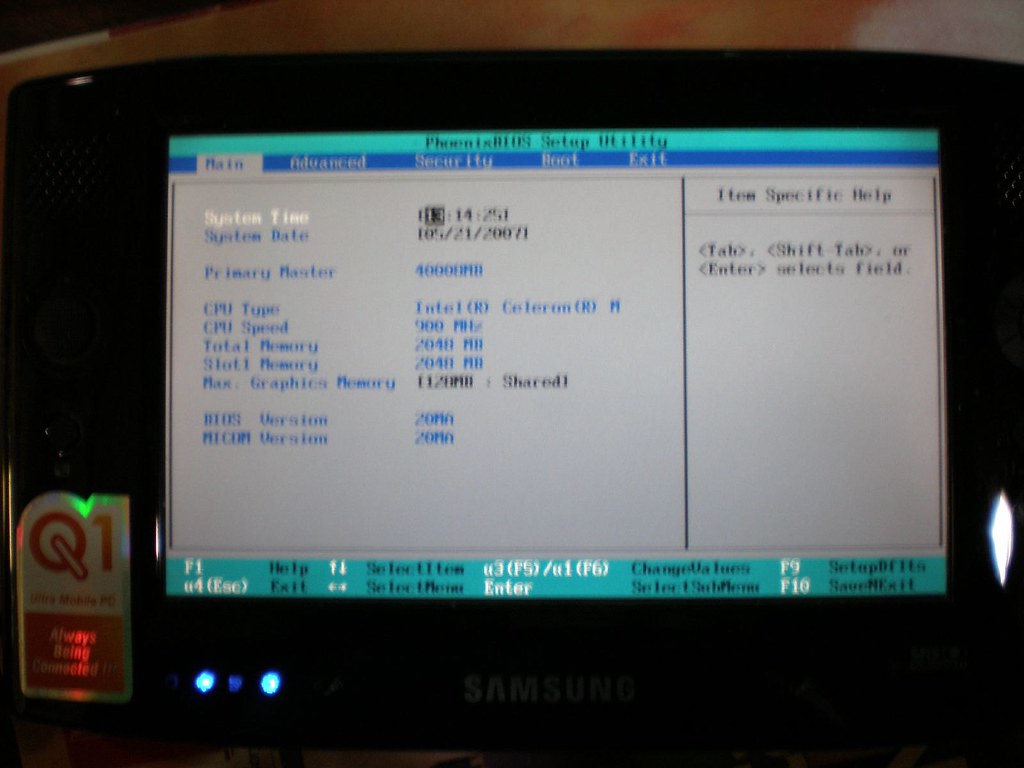
Yeah, I just tested. I ordered the last week the 2 GB SODIMM Modul from UpgradeComputerMemory.com and as soon as I received today I opened my Samsung Q1 with Celeron Processor and switched the RAM modules. And here is the first result:

P5210003

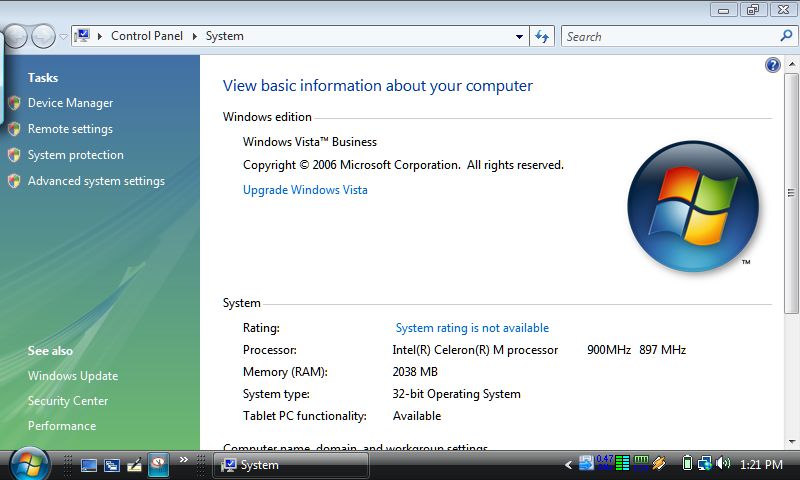
The above picture is a little be blurry but it can be seen clearly how the BIOS version 20MA recognized my 2 GB module. I saved the new information in the BIOS and started Vista, and here is the second screen shot, this time of Vista reporting to have 2 GB of RAM:

Capture

I'll run a few other performance tests tonight. So far I'm a happy camper! Yahhhoooooo!!!!

Friday, May 18, 2007

Vista Drivers officially released for Q1

I just found at Origami Project Forum that Samsung has relased finally officially Vista Drivers for Q1 that can be downloaded here. I have not compared yet the version numbers of these drivers versus those ones that came originally with the first batch of Q1p released to the market, I'll do it later today and I will report back of any difference.

Monday, May 14, 2007

Turning your BT OFF in your Q1 with Vista

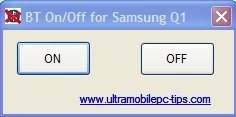
After I posted this post about the not being able to turn off the BT Device in my Q1 with Vista installed using the latest BT Driver I received a lot of comments from people trying to help in one way or another. A friend of mine, Angel Garcia (hal9000) advised me to use DevCon to disable or enable the BT device. I tested it and DevCon works like a clock but it's not that easy to use so, to make it easy I created a little tool that can be downloaded here. Just unzip the file in one folder and create a shortcut in your desktop.

btonoff

As you can see from the above picture it's a very simple tool. The OFF button will disable the BT Device (you can check it using the Device Manager) and the ON button will enable it back.

If you are using the latest version 6.xx.xx of the BT driver you will need this to turn off the BT device. Users with version 5.xx.xx do not need this little tool.

Wednesday, April 25, 2007

Samsung's Etiquette Mode

Recently I read somebody complaining about the fan noise in a Q1. Let me start by saying that my Q1 fan works quieter than the fan on my eo v7110 and a lot quieter than the one in my Compact notebook. To be honest I can't even notice the noise of the Q1 fan, but some people are ready picky with that. Well there is a solution. Samsung has added an option in the MenuUI called "Etiquette Mode". This option decrease the fan speed in half and that reduce the noise almost to nothing. Of course, expect your Q1 to work warmer.

Saturday, April 14, 2007

Is Q1 good for students and business?

Probably is not the best option according to one of the latest review I read at Student Tablet PC. But I think that if somebody owns a tablet pc and start using a UMPC this person needs to understand that he or she is using a device with some specifications that are completely different than what that person had before in his or her Tablet PC. For example, a Small screen and on top of that, a touch screen.

This is why I consider this review posted recently in Origami Project a very good example that shows that a Q1 is (if you know how to use it properly and you are willing to learn and overcome its limitations) a powerful tool in the hands of any student.

First off, let me say that I do not put much stock in many of the Q1 reviews out there. It made me nervous to see all the negative reviews when I first bought my Q1. I was waiting for it to arrive and I kept seeing many of the negative reviews in major PC magazines, and it honestly made me wonder of I had made the right choice. I did, however, notice that many reviews from individual users were very positive. After using the Q1 for a few weeks I can see why users like it so much.

Last week I went to Lean Six Sigma (LSS) certification training, to finish my certification requirements. Lean Six Sigma is the adoption of two business theorys that center on 1. reduction of waste and 2. reduction of variation (mistakes) in a process. It is a pretty intense training course and the classes have many requirements that make a computer a very handy device to have. Since the course was off-site, and there were several large books that were needed for the class, the UMPC is a perfect choice for this training.

in LSS training one must take copious notes. There is a great deal of formulaic data that is used in the LSS business philosophy, so having detailed notes is a must to pass the course. I had purchased the Q1 organizer and keyboard from CDW before the course and I am glad I did. I can certainly type faster than I can handwrite and the decent sized Q1 keyboard was very useful. I worried that the pointing stick, nestled between the G,H, and B keys, would get in the way from time to time (I have had this problem with laptops in the past) but I never even felt the thing while I was typing. I have noticed that many compact keyboards are a challenge to type on when you are not looking at the board itself, but I found this keyboard did very well and I had no problem typing while watching the presentation slides go by.

If I had needed, I could have used the touchscreen to take notes. As a test I did take notes on Windows Journal during one of the last sessions and found it quite easy to do. I will admit that it takes some getting used to as most of us are used to the physical feedback from putting pen to paper. The touch screen is so smooth that it doesn't feel the same at all. But one quickly finds that this only makes writing faster, and once you are used to using the touchscreen, it is a breeze.

During the course, we also have to do many calculations. I found that OpenOffice Calculator was a perfecct spreadsheet program for these calculations. Many people in the class simply used a calculator, but I was much faster since I could simply put the formula in a cell then just type in the parameters in the appropriate cells. This saves a ton of time that most used up when they had to redo the entire calculation on their handlheld calculators.

We had several graphs and charts that we needed to make during the class and the touchscreen capability was perfect for this task. A few people had laptops in class, and they used them to set up their charts, but I noticed it took much longer to do compared to the touchscreen.

One of the things that is a requirement for passing the class is a presentation to demonstrate our understanding of key LSS concepts. I was able to put my presentation together during the class instead of waiting to do it on my time each evening. When it came time to conduct my presentation I was able to simply unplug the Q1 keyboard and take the Q1 itself up to the front to plug into the projector. Most who had to do presentations found it necessary to load it on a USB drive so that they could load it onto the instructors PC. The touchscreen was great for writing out the formulas, circling important points and demonstrating the concepts I was trying to present. It seems that the Q1 ended up getting more attention than the presentation, but I was more than happy to show off my new "toy."

Many of the negative Samsung Q1 reviews seem to result from reviewers who try to compare it to a full blown desktop or laptop PC. On the other end of the spectrum, there are those who want to compare it to a Pocket PC. Sure, in either of these comparisons the Q1 is going to loose. It does not have the latest super mega-monster processor, so it may not run 15 major tasks as well as the latest laptop design that hit the market. It is a bit large for pocket carry, so it looks too big in comparison to my iPAQ hx2795.

What the reviewers fail to notices is that the UMPC sits nestled right between these two types of devices. It occupies its own niche, therefor it deserves to be reviewed and compared in that niche. If I were to write a review on my CBR600F4i and compare its cargo carry options to a Ford pickup, it would not do well. If I compared its fuel efficiency to my Cannondale bicycle it wold also do poorly. But for what it is, it is a great motorcycle. The Q1 is like that, it does well within its own category.

Since buying the Q1 I have added a CD-rw drive by LaCie. I know many have complained about the lack of CD drive on the Q1, but that addition would defeat part of the mobility purpose of such a device. Sure, there are all kinds of extras I could add to a UMPC to give it more usable features, but then I might not be able to carry it in a coat pocket like I can with the Q1.

Since buying the Q1 I have become a total UMPC fanatic. I am interested in the OQO model 02 and the new Q1 Ultra, and would love to have either one. However, I cannot say that I am disappointed in the Samsung Q1's performance. If you have a need for mobility and you are looking for a decent device to use for business, I highly recommend the Samsung Q1.