"The only way to be truly satisfied, is to do what you believe is great work. And the only way to do great work is to love what you do." Steve Jobs
Once "inking" gets into your veins you will never be able to live without it. Frank J. Garcia

Showing posts with label Vista. Show all posts

Monday, February 16, 2009

Ultimate Windows Tweaker

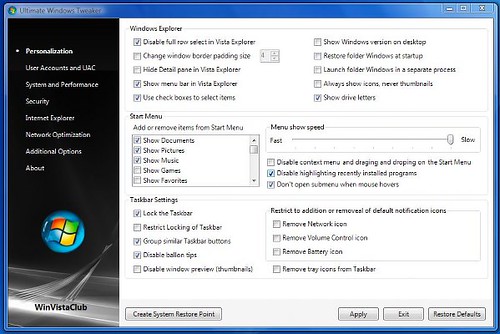
There are many Windows “Tweakers” out there but not many are freeware or made by a MVP. And this last point is very important when you are putting  the stability of your OS in the hands of this type of software. Ultimate Windows Tweaker is Free and was made by Ramesh Kumar, MVP in Windows Desktop Experience.

Ultimate Windows Tweaker is a freeware Tweak UI Utility for tweaking and optimizing Windows Vista, 32-bit & 64-bit. It can simply be downloaded and used as a portable application to customize your Windows Vista to meet your requirements. With judicious tweaking, It can make your system faster, more stable, and more secure with just a few mouse clicks. The tweaker detects whether you have IE 7 or IE 8 installed and accordingly offers you the relevant tweaks only. This Tweaker was released at the Microsoft South Asia MVP Meet 2008.

vistatweaker

Tuesday, September 30, 2008

Snipping Tool in Vista

Vista includes now tools that were part of Windows Tablet PC Edition and not included in XP. One of them is the Snipping Tool, one of the most useful tools in the Operating System for those like me trying to keep alive a blog.

<a href="http://video.msn.com/?mkt=en-US&amp;playlist=videoByUuids:uuids:41991158-5cf1-4646-8911-b0f59ed63b11&amp;showPlaylist=true&amp;from=msnvideo" target="_new" title="Windows Vista Demo: Snipping Tool">Video: Windows Vista Demo: Snipping Tool</a>

I like this effort of Microsoft trying to create educational videos that show how to use the new capabilities of Vista. It’s a lot better than going around criticizing other Operating Systems. Show me what you do and I’ll decide if that’s what I need.

Thursday, August 28, 2008

Humans have short memory

I'm going to post today a fragment of an article where I have removed the Operating System name in a few places. 

[Operating System Name in here] is also a Trojan horse that enables Mr Gates and a horde of even less welcome folks to invade your privacy, exploit your computer and empty your wallet.

So why are all these idiots in computer stores drooling at the prospect? Answer: because [Operating System Name in here] is a monstrous, bloated brute that requires a state-of-the- art PC and two gigabytes of hard disk space before it will even say 'hello'. This means any consumer foolish enough to want to run [Operating System Name in here] will probably have to buy a new PC.

Does not this sounds familiar to you? is not it like the author is talking about Vista? Well, be surprised, this article was posted at The Observer, in October 21st of 2001 and it was talking about Windows XP. The same Windows XP that many are now recommending to stay with instead of installing Vista.

Have you heard of Mojave Experiment? Click in the link and check the videos in there. They are self explanatory.

Wednesday, August 27, 2008

SanDisk releases 30MB/s SDHC cards

This is a very good news for those looking for a fast memory card to use it with Vista Readyboost.

SanDisk is releasing 30MBps SDHC that can write 39 6MB frames at 4.5 frames per second without stopping to take a breath. These cards are 10MBps up from the former 20MBps cards offered earlier.

CrunchGear

Monday, August 25, 2008

Vista Annoyances Resolved

So far the best article I have read about Vista and its so called "issues".  The author shows with facts that we are living now with Vista the same process that we lived years ago with XP. And not only that, the author presents a series of tips to make your Vista experience a lot better.

An operating system is no ordinary piece of software - it's the platform upon which a potentially limitless combination of hardware and software operates. A lot of the 'annoyances' people often quote are actually default features deliberately designed to accommodate the broadest range of uses and users. In other words Microsoft has configured Vista to suit the 'average user' by default, however there is no such thing as an actual average user; each and every user is different. For this reason Microsoft has also provided a large number of settings and options both above and beneath the hood of Windows so that end users with the appropriate knowledge or guidance can customize Vista to better suit their particular needs. That's where this article and the TweakGuides Tweaking Companion (see below) come in. The aim is to provide you with the relevant information and guidance to help you understand how things work, point you to the tools you can use to customize the settings, and the impact those changes are likely to have.

Thursday, July 31, 2008

Microsoft's Vista Performance and Tuning Guide

Microsoft has released a PDF Document showing users what to do to tune Vista for a better performance. The Guide that is available for download here can be categorized as a good start point and I hope that Microsoft keep posting other guides like this one. 

Vista Performance and Tuning Guide. It is available as a download through the Microsoft site and will guide you through the most common changes you can make to Vista to get better performance, especially out of computers with borderline components such as mobile PCs. Give it a try and see how it works for your setup.

Via: jkOnTheRun

Wednesday, June 25, 2008

Windows XP was not a lot better

I read daily a lot of comments from people frustrated with Vista, the latest operating system from Microsoft and all of them have one thing in common, they end saying that they are going back to XP because XP is just a lot better.

Well, today, I read a not at Engadget that pointed me to an article where the author asked Bill Gates about an email sent by him describing his frustrations with Microsoft's Web Site and... You guessed... Windows XP.

Someone decided to trash the one part of Windows that was usable? The file system is no longer usable. The registry is not usable. This program listing was one sane place but now it is all crapped up.

But that is just the start of the crap. Later I have listed things like Windows XP Hotfix see Q329048 for more information. What is Q329048? Why are these series of patches listed here? Some of the patches just things like Q810655 instead of saying see Q329048 for more information.

What an absolute mess.

The above is just one of the comments of Bill Gates reflecting his frustration with the fact that he could not download and install Movie Maker. I'm glad to see that I'm not alone. I can't make Movie Maker to recognize my own profiles in my Vista Machine. The funny thing is that I went and downloaded the version 2.6 prepared for machines that do not have Aero and that version do recognize and work fine with those profiles. So... After 5 years, because that email was sent in 2003, we have not seen a lot of improvement with WMM.

But anyway, my whole point is that back in 2003 people were complaining about XP probably in the same way that probably those same ones now are complaining about Vista. And probably in about 5 years those same people will tell you that Vista is the best OS that they have used ever.

Full text: An epic Bill Gates e-mail rant

Tuesday, June 24, 2008

Pictures for your Desktop

I have been taking some pictures lately to use it in my Windows Desktop. I have shown them to few friends and they liked it and asked me for the permission to use  them in their PCs. So I though that may be that some of you may want to do the same so here they are.

IMG_0025cIMG_0051IMG_0027IMG_0028

IMG_0029IMG_0032IMG_0035IMG_0019

IMG_0013IMG_0025

Here is the link to this set.

Saturday, June 14, 2008

Origami Experience 2 just released

Microsoft has just released Origami Experience 2, the popular software within the UMPC owners. The software which can be downloaded here, includes a new functionality called Now that helps users to quickly access many other functions.

There are two new options that I love very much: Password, a new password screen for Windows that uses pictures, and a "tile" that allow me to check animated pictures posted on the web. I use this tile linked to a Weather Radar image of South Florida.

Friday, May 23, 2008

Leopard vs Vista handwriting recognition

Here is one of the reasons why I love Vista, and that all I want in my Tablet PC or UMPC. This video says more than 1000 words.

The handwriting recognition in Vista is the best I have seen. Period. And you can be sure that I have tested a few of them in my quest for the best one.

Wednesday, May 21, 2008

James needs Vista but he likes OS X

James from JKonTheRun has published a very interesting article about two of the most important Operating System in the market: Vista and Mac OS X. Let me start by saying that the reason why we have this kind of article is because we have what we can in Vista.

The situation with Vista is quite a different matter because it is the operating system that is running most of the computers I use.  It is running four computers in my office right now and I depend on it to get work done.  I don't blame Microsoft when I have hardware problems because they don't make hardware and it would be silly to do so.  But I do blame them quite fairly when the OS doesn't do what I need it to do especially when I believe it is something that it should do properly  My heavy usage of Vista-running PCs exposes me to a lot of situations when Vista drives me crazy.  I'm not going to get into specifics here because that's not the purpose of this article but it is a hard, cold fact that every single day something happens on one of my PCs that makes me angry at Vista.  That's a terrible thing to say about any product but it's absolutely true.  At least once a day I end up saying "I hate Vista" because I'm trying to do something and Vista gets in my way to get it done.

Three weeks ago I would not understand why James is complaining about Vista all the time. Three weeks ago I was lucky enough to be using Vista in a machine where the maker did a wonderful job developing all the drivers for that machine, I'm talking about my Samsung Q1. Beside the fact that Vista was not the faster OS for that machine, everything was super stable on it and I never had any problems at all. I only ran one time into a device - a webcam- where I could not make it work because of the drivers but I was able to returned it and buy a new one Vista compatible.

But now things have changed. I bought a Fujitsu P1610 and even when Fujitsu has released a set of Vista compatible drivers the quality of them is not the best and Vista is fully unstable. But even in this situation, Vista is good enough to recover itself without giving me a BSOD. I have been battling for two weeks already tuning the drivers and looking for more updated version or substitutes for these drivers. And every time I have found one my P1610 works better and more stable. And this is one thing that I want to point. When you have your machine using Vista drivers that are not fully compatible with Vista, even if the OEM says that they are, that will affect your whole work in that machine. To give you one example, I was having problems with WiFi. Even at 10 feet from my AP the signal level was around 20%. I reinstalled the drivers and checked them to be sure that they are properly working and every thing was OK. I then searched the web for the most updated driver for that module, even if it was released by a different OEM and I found one, I installed it and all the problems disappeared. The same thing happened to my Audio driver. The ones I found in multiple Fujitsu sites were too old and some of them listed by Microsoft within the known incompatible drivers for Vista SP1. I ended installing the audio software from Fujitsu and manually installing the driver from HP. That combination is working more stable at least for now.

But... How the normal consumer can survive all this? Why somebody should spend two weeks optimizing and looking for drivers to have a working machine and OS? Why the drivers in some OEM web sites, like Fujitsu are more than a year old and never have been updated? is not because they do not care about a year old machine any more and they are pushing buyers to get the latest of latest machine that they are selling? Why some of the OEM are not supporting any more products that they are still selling? They sell you a Web cam and when you upgrade your OS you find that this Webcam maker is saying that they will not create any drivers for the new OS, instead they are asking you to look into the latest version of the same piece of crap which definitely have drivers for the newest OS. And the same thing with some software. They tell you "the version that you are using is not compatible with Vista and we won't patch it to make it compatible so what you should do is to re pay us for the latest version". 

So, as you can see, my problem is not with Vista, it's not with Microsoft, at least partially, it's with the whole macro system created by OEM to make money using every Microsoft big upgrade. And I said partially because Microsoft seems to enjoy the creation of OS with the most of incompatibilities as they can. It seems to me like the developers are sitting in their offices using the most powerful machines in the market to create their new OS. Well, guess what, for Windows 7, my dear Microsoft, you should buy to your developing team a bunch of 486 and make them to create Windows 7 compatible with those machines. I'm sure that only then we are going to have a real fast and stable OS.

Monday, May 19, 2008

Superfetch, leave it on or turn it off?

Let me start this short article by quoting what's the definition of Superfetch according to Microsoft:

Windows SuperFetch enables programs and files to load much faster than they would on Windows XP–based PCs.

When you're not actively using your computer, background tasks—including automatic backup programs and antivirus scans—run when they will least disturb you. These background tasks can take up system memory space that your programs had been using. On Windows XP–based PCs, this can slow progress to a crawl when you attempt to resume work.

SuperFetch monitors which applications you use the most and preloads these into your system memory so they'll be ready when you need them. Windows Vista also runs background programs, like disk defragmenting and Windows Defender, at low priority so that they can do their job but your work always comes first.

So, from this you can easily guess that this feature was designed to increase your system performance. Then, why if you look around the web you will find as many posts and articles recommending to turn it off as articles saying that it should be left on? The answer is Simple, because it does not work well in all the different hardware configurations available in the market.

Wednesday, May 07, 2008

Inker: A Tablet Input Panel alternative

Our friend Kevin at JKonTheRun has found a TIP new alternative. 

Atozed Software is confident that they have a Tablet PC Input Panel alternative that's more efficient than the native TIP found in Windows. After watching the demo video, they might be on to something, but I'll have to install "Inker" and give it a try. My general observation is that Inker might be preferred by some, but it looks a bit too cluttered for my use on a UMPC. I do have a full-sized Tablet PC though so I can give it a go on both.

Unfortunately I'm very busy lately to test it because I'm moving everything to my just bought Fujitsu P1610. In another hand, I'm really happy with Vista TIP, for me is the best.

Friday, May 02, 2008

My P1610 goes back to Fujitsu

After of fighting for more than 16 consecutive hours trying to install Vista Ultimate on it without any luck, I finally got Vista Business Installed. To make the story short, I started around 6 PM installing Business, all needed patches, SP1, Office 2007, and moved all my settings from my Q1 to my P1610. The whole process ended about 2 AM. I went to bed to sleep about 4 hours. At 6 AM I was up trying to turn on the unit and guess what. The Power Button was going from the pretty blue into an ugly red and nothing more. Nothing in the screen, no beeps or LEDs blinking.

I called Fujitsu Tech Support and they gave me a RMA number to send the unit back for repair.

So what I learned from the whole process: Vista Ultimate is the best diagnostic tool that you can find in the market. It was right the whole time, there was something wrong with that unit.

Thursday, May 01, 2008

Vista does not like my P1610

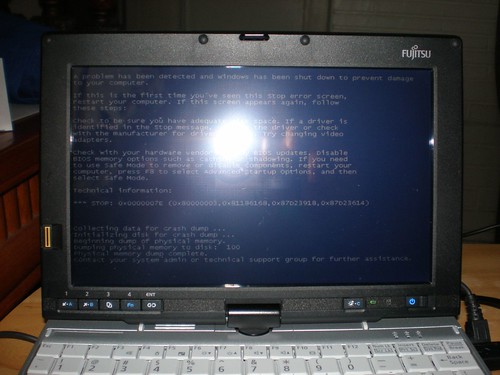
I feel so bad. I have been using Vista in my Q1 for more than a year and when I bought the P1610 the only thing that was not in my mind was to use it with XP. I checked all the web and I found everywhere people installing Vista in their P1610 without any issues. So Yesterday I did not bother to play with my P1610 and XP, I just went and started to install Vista on it. And after around 2 hours of installation this is what I got:
P4300012

I called Fujitsu Tech support after trying for a Second time and getting the same error right in the same spot during the installation, and you guessed, the lady on the phone knew nothing about this issue. After talking with her for around 30 minutes and telling her that every single thing that she was recommending me to do I already have done it she gave me Microsoft free tech support number saying that it was a Microsoft issue because XP was running on my machine without any problem so it was not a hardware problem.

Of course, I did not called Microsoft, Microsoft has everything well documented in their sites. I searched the error number 0x0000007E and I found this page.

A "Stop: 0x0000007E" error message or a "Stop: 0x0000008E" error message typically means that a kernel mode component, such as a driver, encountered an error that could not be handled by the built-in Windows error handler.

If I knew which one was the one with the problem. But the error is during the installation and when you restart the PC the only thing you get is a message saying that the installation was not completed and that you have to start over from the beginning.

I tried also upgrading instead of a full clean install but the result is the same. The upgrade ends in a BSOD.

Now, I'm trying again a clean install, this time a pre loaded some of the Fujitsu Driver using the Load Drivers from the installation and I'm using a different external DVD ROM and a I re-burned the Installation DVD that I downloaded from MS again in a new DVD from a different machine, just in case. So... in about... 2 hours I'll be back with the result.

If anyone knows about this error or can help me in any way, please let me know. TIA.

Update: Here I'm 8 hours later and 3 more installations that ended in BSOD. I disabled in the BIOS the BT, WiFi and Ethernet and tried it and that did not fix the problem either. I also tried an upgrade running the setup from the HDD, but that did not help.

Contacted again the Fujitsu Tech Support and they are going to escalate my ticket.

My next try is going to be install just Vista Business.
Wednesday, April 30, 2008

P1610: BSOD during Vista Ultimate Installation

I got my P1610 about 2 hour ago and the first thing I did is to launch the Vista Ultimate with SP1Installation. But apparently today is not my lucky day. Right when it was completing the installation the system crashed with the Blue Screen of Death.

I'm browsing the web to see if anybody had that problem before but so far I have not found anything like that being reported before.

I'm reinstalling again to see if I'm lucky this time.

If it happen again then I'll try Vista Ultimate without SP1.

Friday, April 25, 2008

Should Microsoft keep XP?

I was reading CNET News today to find Ballmer's comments about Microsoft's plans to phase out XP this summer.

"XP will hit an end-of-life. We have announced one. If customer feedback varies, we can always wake up smarter, but right now, we have a plan for end-of-life for new XP shipments," Ballmer said during a Thursday news conference in Belgium, according to Reuters.

I think that something is wrong with Microsoft's feedback and as MVP I think that I gonna start sending my feedback to them the best I can. So far the majority of people that I talk to and has bought new PCs has downgraded them to XP. I love Vista, that's what I use in my UMPC which is my main PC. But that does not mean that I'm blind. Vista still slow like hell. Vista still have a lot of problems with drivers - I know that this is not Microsoft faults - and this makes it a OS not good for business. Think about it, business do not go crazy every year buying new hardware and basically what I have seen is that OEMs are not going back to create Vista drivers for old hardware, they are pushing businesses to buy new hardware Vista Ready. Even software companies are doing the same. For example, the version of Norton Antivirus Enterprise Edition that I'm using in the company that I'm working for is not compatible with Vista. If I want to switch now to Vista and Windows Server 2008 I have to buy their new version. What for? First of all, I'm not that happy with NA to think about buying a new version from them.

In a few words, switching to Vista is painful for Businesses and for some home users. It means not only learning and training people to use a new OS, but buying new hardware and software, expenses that are not needed or just are not smart in a time where USA Finances are not so good. So, either the reports that Ballmer reads every morning about Vista are just lies or he just want to ignore them. Users love XP and users do not like at all Vista. That's a fact that I can't ignore even when I love Vista. It's slow - even with SP1 - and it still have a lot of drivers issues. And it's the last thing I would recommend to any business owner.

Thursday, April 17, 2008

The truth behind UAC

A few days ago Information Age published an article quoting comments of David Cross, a Microsoft Employee participating in RSA Conference in San Francisco. In his speech David said what I consider a joke:

"The reason we put User Account Control into the Vista platform was to annoy users – I'm serious.” 

And I considered it a joke because later in his speech he explained how these warnings from UAC were real and were part of a plan to improve independently-developed software.

"UAC is changing the ISV ecosystem," he said. "Applications are getting more secure [as a result]. We needed to change the ecosystem, and we needed a heavy hammer to do it."

According to Cross, 88% of Vista users have the feature enabled, contrary to the popular belief that disabling UAC is one of the first steps many take when setting up a Vista system.

The bottom line is one. Independent developers or freelancer usually do not have the kind of money asked by Microsoft and other companies to certify their programs and that's all it takes to get rid of these warnings in many cases. Taking in consideration that, I decided a long time ago to be part of that 12% that Microsoft talks about. In what group are you? the 12% or the 88%?

Tuesday, March 18, 2008

Windows Vista SP1 Released to Windows Update

That's the news published today at Windows Vista Team Blog.

Today, you can now download Windows Vista SP1 via Windows Update. For those of you eager to receive the benefits of Windows Vista SP1 - you can now do so! We've seen quite a bit of questions in our comments so we want to communicate as much as possible surrounding Windows Vista SP1 and today's release to Windows Update as we can.

According to this site:

SP1 will start downloading to PCs automatically beginning in mid-April (Remember, this happens only if you have your Windows Update configured to automatically download updates and SP1 will automatically download but not automatically install).  But if you want to get the benefit of a year's worth of improvements right now, go check Windows Update today...(Hit the Start Menu, All Programs, and select Windows Update).

I installed a few weeks ago in my Samsung Q1 and I felt the difference, I wont say that you should expect miracles but it helps. So far, I have not had any problems or issues so far.

Tuesday, February 26, 2008

Fixing Vista SP1 installation issue

I installed Vista SP1 in my Samsung Q1 about a week ago and was lucky enough to get everything working from the first moment without any problem. But that's not the case for many users that have reported the installation process to go crazy in a endlessly reboot.  Here is a link for 3 possible solutions brought by Microsoft for this issue.

This problem occurs when Windows Update is installing update 937287 for Windows Vista.
For more information about update 937287, click the following article number to view the article in the Microsoft Knowledge Base:

937287  A software update is available for the Windows Vista installation software feature