"The only way to be truly satisfied, is to do what you believe is great work. And the only way to do great work is to love what you do." Steve Jobs
Once "inking" gets into your veins you will never be able to live without it. Frank J. Garcia

Showing posts with label HID Drivers. Show all posts

Sunday, February 28, 2010

HID Driver for Viliv S5

This is a really good news for Viliv S5 owners. Those that installed Windows 7 in these devices probably were disappointed when they found that there was not full HID support for the Viliv S5 touch screen. Well, Hugo Ortega has released this driver at his blog. Bravo Hugo!

I am extremely excited to share with you that Viliv has one of the most exciting updates a Tablet enthusiast can imagine, i.e. a HID (human Interface Device) Driver for their S5. With the driver the unit gets a dose of steroids allowing it to function properly with stylus and much more! Without the HID Driver the unit clumsily calls-up the TIP (Tablet Input Panel), stumbles through calibration and suffers as a Tablet PC when compared to post-upgrade!

viliv_S5_calibration_HID_TIP

Wednesday, September 30, 2009

HID Drivers for the Viliv X70

Finally a beta version of a HID Driver for PS/2 that works in the Viliv x70 device has been released to an user that kindly has given it to me to host it.

The driver can be downloaded here.

Tuesday, September 01, 2009

Viliv S7 is not Windows Touch Compliant

I have been asking some information about this device at UMPC Portal, and I got this screen shot from the Device Manager of this device.

screenshot2-1

In there you can see the Jastec RU Touch Screen Controller listed under Mice and nothing listed under HID Compliant Devices. This means that if Windows 7 is installed you will be missing all the Touch Screen features that come in this OS. Another device that is not Windows Touch Compliant.

The Archos 9 may not be a Touch Compliant mini Tablet

I’m going to start calling Touch Compliant to those devices where the hardware/drivers installed is supporting all the touch screen functionalities of Windows Vista and Windows 7.

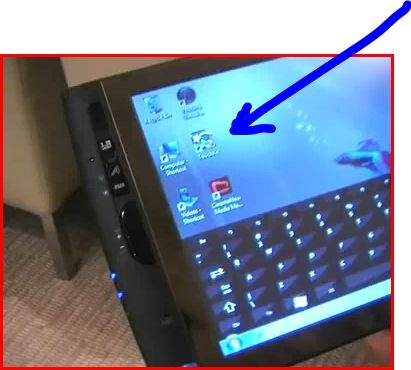
I was checking one of the few videos of the Archos 9 with Windows 7 Beta installed and found the TouchKit icon in the screen of the device shown in the video.

Capture

The full video can be seen here:

From the video I could not see at least one time any evidence of the use of a HID Compliant Driver. In another words, I did not see any of the touch screen features of Windows 7. In fact, for being a Tablet PC, I found extremely weird the fact that nobody has shown at least one time how the Tablet PC Input Panel works in this device. In fact, I find weird to see that they went to the extreme of designing an on screen keyboard when the one in Windows 7 can be docked in to bottom of the screen and used in the same way than the one in the video.

Please, if you are planning to buy this device read this first.

Monday, August 31, 2009

eGalax Touch Screens are not always USB-HID Compliant.

eGalax Touch Screens are not always USB HID compliant and if they are not USB-HID Compliant then they are not Windows Vista/7 Touch Compliant .

Are you affected by this issue?

Let’s start by saying that the eGalax Touch Screens made by EETI uses a Touch Resistive Panel Controller (it can be capacitive but most UMPC and Tablet PC use the Resistive one) that can be connected using 3 different interfaces: USB (Hardware ID: USB\VID_0EEF&PID_0001 or USB\VID_0EEF&PID_0002), RS232 (Hardware ID: SERNUM\EGX5800, SERNUM\EGX5900, SERNUM\EGX6000, SERNUM\EGX5901 and SERNUM\EGX5803) and PS/2 (Hardware ID: *PNP0F13).

How do you know if you have a eGalax Touch Screen?

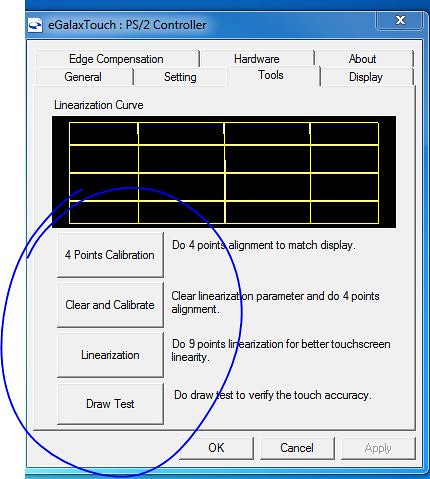
Usually eGalax Touch Screen requires of a OEM made utility to calibrate the screen. This utility is called most of the time Touchkit (Touchmon) but I have seen it rebranded or renamed to other names. The screen that allows you to calibrate the screen looks like this:
Capture3

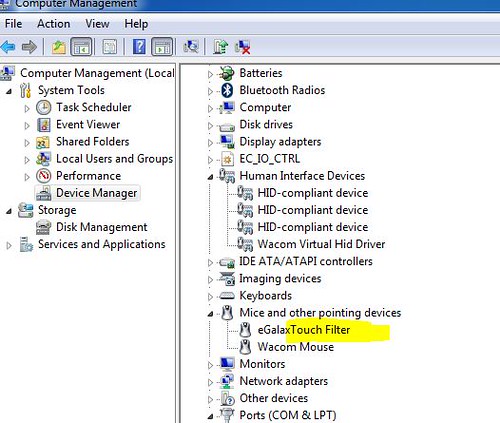
You can find the hardware ID of your touch screen using the Device Manager.
Capture

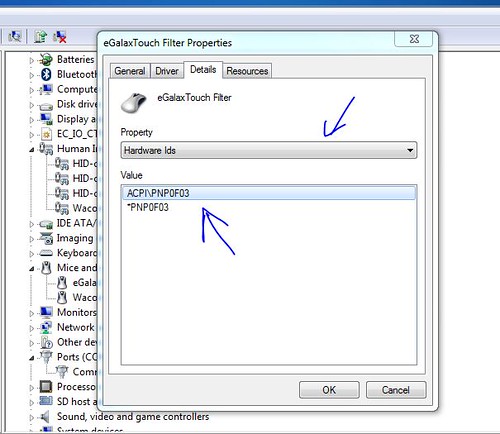
If you have a HID Compliant eGalax Touch Screen it should be listed under Human Interface Devices if you don’t see it there then it should be listed under Mice and other pointing devices. In either case if you do a right click, properties on top of the device you will see the following screen where under Details, Property, Hardware IDs, you can find the hardware ID for the installed device.
Capture2

Once you have found that you have a UMPC or Mini Tablet PC with a eGalax Touch Screen and you have found what kind of interface it’s using by comparing the Hardware ID with the list I gave at the beginning of this article what do you need to know.

If you have a RS232 or a USB interface most likely that your device is USB HID Compliant and you will see it listed in XP under Human Interface Device, if that’s the case then in Vista or W7 you will see it listed in that category and you don’t have any problem. But I said most likely because I had the situation in the past where a device with a USB Interface (Samsung Q1) did not have HID support because the eGalax drivers was not prepared with the HID protocol. If your device is using a PS/2 interface most likely you will never see any of the Touch Features of Windows 7 and Vista because your device is not HID Compliant.

What HID Compliant means?

HID means Human Interface Device.

“Most operating systems will recognize standard USB HID devices, like keyboards and mice, without needing a special driver [This is the case in Windows 7 in my experience installing it in 3 different devices using touch screen]. When installed, a message saying that a "HID-compliant device" has been recognized generally appears on screen. In comparison, this message does not usually appear for devices connected via the PS/2 6-pin DIN connectors which preceded USB. PS/2 does not support plug-and-play, which means that connecting a PS/2 keyboard or mouse with the computer powered on does not always work. In addition, PS/2 does not support the HID protocol.”

How this affects you?

If you are using Windows XP Home Edition:

  • no floating tip
  • no focus on text field after opening tip
  • no panning hand on IE
  • right click menus popping while scrolling
  • right click confused by the OS as a click.
  • no pen flicks
  • crappy looking handwriting.
  • No Ink support in Office and Outlook.
  • No Ink recognition software (In Tablet PC Edition, the recognition software is present but does not work properly.
  • All Tablet PC functionalities from Control Panel are missed.
  • No ink support in Windows Live Messenger

If you are using Vista or Windows 7:

  • Different onscreen keyboard (Vista)
  • No on screen keyboard in the profile logon screen
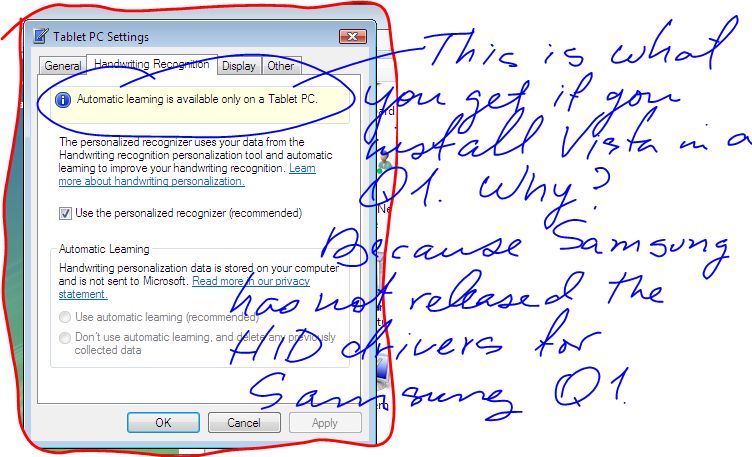
  • no Automatic learning from your handwriting
  • no floating tip
  • no focus on text field after opening tip
  • no panning hand on IE
  • right click menus popping while scrolling
  • right click confused by the OS as a click.
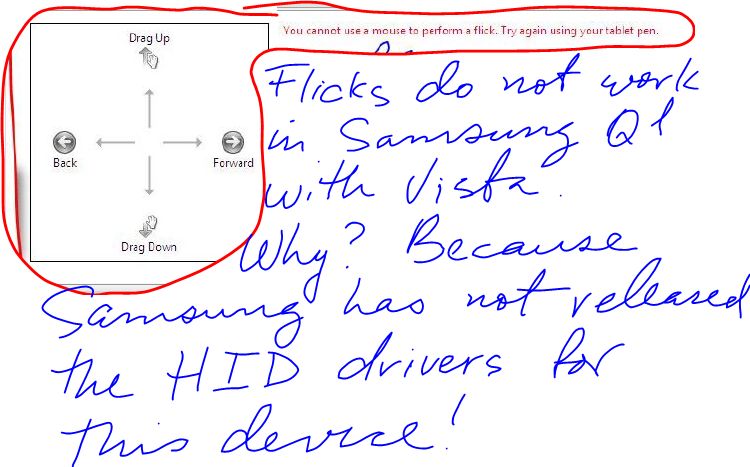
  • no pen flicks
  • Tablet PC software missed in accessories (Vista)
  • all tablet PC software not accessible (including Applets from Control Panel)
  • crappy looking handwriting or with a very slow and bad performance. Recognition rate very low compared with the one in a HID Compliant device
  • No Ink support in Office and Outlook 2007
  • No Ink support in Windows Live Messenger

These missed or “no working properly” features do not sound that important for somebody that never has used them. But any person that has used before a touch screen with HID support or a Tablet PC will have a hard time trying to use on of these devices. To give you an idea, when I switched from my Tabletkiosk eo V7110 to my Samsung Q1, I ended using more the eo than the Q1 just because I could not get used to to the fact that I did not have these features in my Q1. And the Samsung Q1 was a better device. I only started using for real the Samsung Q1 when I received the eGalax Beta Drivers with HID support. One important note, after I received those drivers EETI released many version of the Touchkit and in none of them included the HID Support needed for the Samsung Q1. And we are talking about something that happened back in 2007. This means that if you do not have HID Support from Touchkit (Touchmon) at this moment the possibility of getting it in the future is almost none. Installing W7 in a touch screen device without HID Support does not make too much sense to me because you are missing the best part that W7 brings to these type of devices. Without these features you better stay with Windows XP. Will I buy a Touch Screen Device that is not HID Compliant? The short answer is NO. I'll be missing if I buy one part of the functionalities of Windows 7 has designed to work with Touch Screens. Functionalities that have been described many times as the best you can find in any Operating System in the Market. I'll be missing the best Handwriting Recognition Feature currently available in the market in any Operating System.

Why UMPC and mini Tablet PC makers use an interface that is not HID?

One of the reasons is because Microsoft is not distributing any more Windows XP Tablet PC 2005 Edition. OEMs are installing Windows XP Home edition in these devices and this OS does not come with any touch screen features. If you don’t have any touch screen features supported by the OS then you can go away by using the PS/2 interface because your screen just acts like a simple mouse.

Summarizing

Now you are informed, it’s your choice to do an educated decision about to buy or no to buy a device with a touch screen that is not HID Compliant. In fact, we all should request OEM to include that in the specifications of their machine or to ask Microsoft to request from OEM using Windows Vista or 7 in a touch screen device to specify if it’s HID Compliant because from this single point depends whether you will have or will not have all the Operating System Touch Features.

Can this be fixed with a driver update? Well, I have seen it fixed before. I don’t know if that can be done for the PS/2 interface but at least one thing is for sure, EETI is about to release the drivers for Windows 7 and there is not any HID support for this interface.

Note: You can ask questions to EETI using this email: touch_fae@eeti.com

Sunday, July 15, 2007

Origami Project - Minesweeper

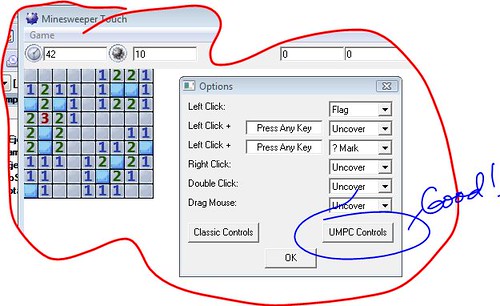
CaptureA Origami Project Member has prepared a Minesweeper version customized for UMPC. 

I've found playing minesweeper is impossible, as it left clicks before it right clicks, thus causing you to lose.

What She is describing is typically found in devices without a real HID Driver. I suffered a lot with this issue in my Q1. Being a eo v7110 owner to me was very hard to get used to my Q1 without HID support. After installing the HID Drivers from eGalax I can hold my stylus on top of any object without triggering a left click.

In this version of this game the author has fixed other issues present while playing it in a UMPC.

. . .right clicking still (probably) involves holding the stylus down for a second which would kill your time/score. I removed that requirement via alternate control methods

But that was only one of the issues with Minesweeper that I fixed.

Technorati Tags: ,

Thursday, April 12, 2007

Finally! HID Support for all Q1s with Vista Installed!

First of all, I would like to thank eGalax (EETI) for allowing me to help them beta testing this driver. Believe it or not, these guys have not received yet a Q1 to work in this project. This tells me the poor interest of Samsung to have you guys installing Vista in your devices. I would like also to thank EETI for allowing me to release this beta driver. They are going to release an official package with more options and functions soon, but in the meantime we can enjoy HID support using this beta.

Enough, the driver can be downloaded here. I included a readme.txt file with instructions, please follow them. Remember, this is a "AS IS" release, and even when I can guarantee that it works you ARE ON YOUR OWN. Do not count on Samsung for help (these guys are busy making money) and do not bother EETI either (these guys are really busy doing a good job).

Note: Ok, it´s confirmed, it works in XP too. The only difference is that you wont be able to use the shortcut included in the zip. Instead you have to create your own shourt cut and in the Open field use this line: tabcal

One bad news, XP users still need the floattip.exe
I'm striking this part because according to many users after doing the calibration using the tabcal tool they did not need anymore the floattip.exe, so this is a good news for XP users too.


Wednesday, April 11, 2007

are we there yet?

How close we are from having HID drivers for our updated Q1s? Well, I'm so pleased to say that we are very very close. As close that I'm writing right now in my Q1 and for the first time my handwriting looks real!

Please, do not bombard me with any request. What I have is beta and I can't released yet. There is not any install yet neither a documentation of how to install what I have. But you can be sure that I'll push hard to have this released soon. ln fact, I have been promised a release this week.

why UMPC Tips has been so quiet lately?

Hum... If I tell you I'll have to kill you. :D

Well, I have been very busy the last 3 days testing something. You all know me. When I was a child my Grandma used to say that if "Frank is quiet you have to run to see what is he doing". And I guess she was right. ;)

I do not want to enter in more details because so far in these 3 last days the results have been bad. But in another hand the good news is that I have not gave up and somebody else with the power to really help has not gave up either!

Thursday, January 18, 2007

It´s time to do something

Even without Vista, it's a totally different experience using XP Tablet PC Edition with HID Drivers.

I just sent this email to Samsung Tech Support (I'm removing the name of the person I sent the email...)

Hi XXXXX
I recently bought for my Company Windows Vista and I´m having problems installing it on my Q1. I contacted Microsoft about it and they told me that the error I´m getting is because Samsung has to release a BIOS upgrade and drivers for Vista so this OS could work properly in the Q1. In another hand I´m worry about the fact that the Samsung Q1 does not have HID Drivers and without these drivers we will have issues in Vista:
  • different onscreen keyboard no loginscreen Some of these
  • keyboard

  • no Automatic learning on handwriting

  • no floating tip

  • no focus on text field after opening tip

  • no panning hand on IE

  • right click menus popping while scrolling

  • no pen flicks

  • Tablet PC software hided in accessories

  • all tablet PC software not accessible

  • crappy looking handwriting

and the list goes on..

Some of these issues are currently present in XP, so even if Samsung does not support Vista Upgrade in current Q1, the HID Drivers still an issue that needs to be fixed. Under XP Tablet PC Edition we have:

  • no floating tip

  • no focus on text field after opening tip

  • no panning hand on IE

  • right click menus popping while scrolling

  • pen flicks

  • crappy looking handwriting.

Please could you help me in anyway with these issues (Vista Drivers and HID Drivers)?


Thanks in advance


Frank J. (CTitanic)
==============================