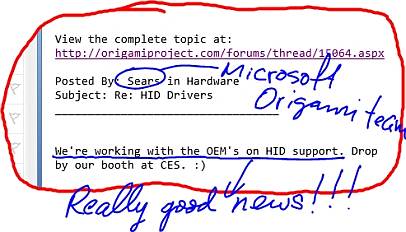
eGalax Touch Screens are not always USB HID compliant and if they are not USB-HID Compliant then they are not Windows Vista/7 Touch Compliant .
Are you affected by this issue?
Let’s start by saying that the eGalax Touch Screens made by EETI uses a Touch Resistive Panel Controller (it can be capacitive but most UMPC and Tablet PC use the Resistive one) that can be connected using 3 different interfaces: USB (Hardware ID: USB\VID_0EEF&PID_0001 or USB\VID_0EEF&PID_0002), RS232 (Hardware ID: SERNUM\EGX5800, SERNUM\EGX5900, SERNUM\EGX6000, SERNUM\EGX5901 and SERNUM\EGX5803) and PS/2 (Hardware ID: *PNP0F13).
How do you know if you have a eGalax Touch Screen?
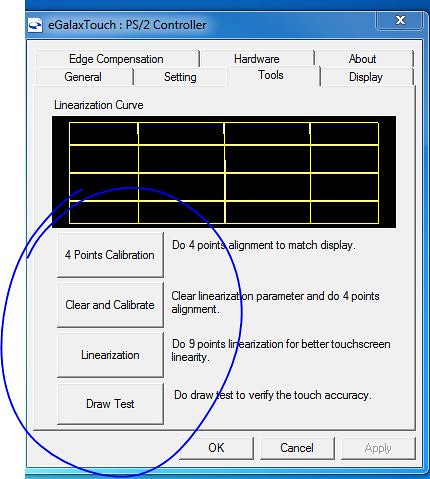
Usually eGalax Touch Screen requires of a OEM made utility to calibrate the screen. This utility is called most of the time Touchkit (Touchmon) but I have seen it rebranded or renamed to other names. The screen that allows you to calibrate the screen looks like this:
You can find the hardware ID of your touch screen using the Device Manager.
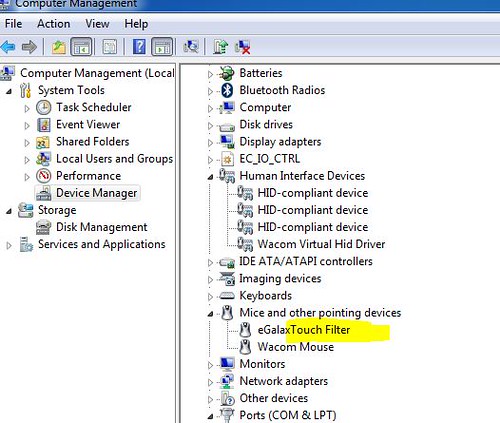
If you have a HID Compliant eGalax Touch Screen it should be listed under Human Interface Devices if you don’t see it there then it should be listed under Mice and other pointing devices. In either case if you do a right click, properties on top of the device you will see the following screen where under Details, Property, Hardware IDs, you can find the hardware ID for the installed device.
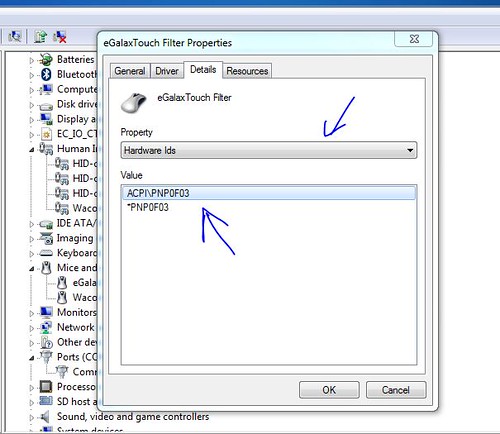
Once you have found that you have a UMPC or Mini Tablet PC with a eGalax Touch Screen and you have found what kind of interface it’s using by comparing the Hardware ID with the list I gave at the beginning of this article what do you need to know.
If you have a RS232 or a USB interface most likely that your device is USB HID Compliant and you will see it listed in XP under Human Interface Device, if that’s the case then in Vista or W7 you will see it listed in that category and you don’t have any problem. But I said most likely because I had the situation in the past where a device with a USB Interface (Samsung Q1) did not have HID support because the eGalax drivers was not prepared with the HID protocol. If your device is using a PS/2 interface most likely you will never see any of the Touch Features of Windows 7 and Vista because your device is not HID Compliant.
What HID Compliant means?
HID means Human Interface Device.
“Most operating systems will recognize standard USB HID devices, like keyboards and mice, without needing a special driver [This is the case in Windows 7 in my experience installing it in 3 different devices using touch screen]. When installed, a message saying that a "HID-compliant device" has been recognized generally appears on screen. In comparison, this message does not usually appear for devices connected via the PS/2 6-pin DIN connectors which preceded USB. PS/2 does not support plug-and-play, which means that connecting a PS/2 keyboard or mouse with the computer powered on does not always work. In addition, PS/2 does not support the HID protocol.”
How this affects you?
If you are using Windows XP Home Edition:
- no floating tip
- no focus on text field after opening tip
- no panning hand on IE
- right click menus popping while scrolling
- right click confused by the OS as a click.
- no pen flicks
- crappy looking handwriting.
- No Ink support in Office and Outlook.
- No Ink recognition software (In Tablet PC Edition, the recognition software is present but does not work properly.
- All Tablet PC functionalities from Control Panel are missed.
- No ink support in Windows Live Messenger
If you are using Vista or Windows 7:
- Different onscreen keyboard (Vista)
- No on screen keyboard in the profile logon screen
- no Automatic learning from your handwriting
- no floating tip
- no focus on text field after opening tip
- no panning hand on IE
- right click menus popping while scrolling
- right click confused by the OS as a click.
- no pen flicks
- Tablet PC software missed in accessories (Vista)
- all tablet PC software not accessible (including Applets from Control Panel)
- crappy looking handwriting or with a very slow and bad performance. Recognition rate very low compared with the one in a HID Compliant device
- No Ink support in Office and Outlook 2007
- No Ink support in Windows Live Messenger
These missed or “no working properly” features do not sound that important for somebody that never has used them. But any person that has used before a touch screen with HID support or a Tablet PC will have a hard time trying to use on of these devices. To give you an idea, when I switched from my Tabletkiosk eo V7110 to my Samsung Q1, I ended using more the eo than the Q1 just because I could not get used to to the fact that I did not have these features in my Q1. And the Samsung Q1 was a better device. I only started using for real the Samsung Q1 when I received the eGalax Beta Drivers with HID support. One important note, after I received those drivers EETI released many version of the Touchkit and in none of them included the HID Support needed for the Samsung Q1. And we are talking about something that happened back in 2007. This means that if you do not have HID Support from Touchkit (Touchmon) at this moment the possibility of getting it in the future is almost none. Installing W7 in a touch screen device without HID Support does not make too much sense to me because you are missing the best part that W7 brings to these type of devices. Without these features you better stay with Windows XP. Will I buy a Touch Screen Device that is not HID Compliant? The short answer is NO. I'll be missing if I buy one part of the functionalities of Windows 7 has designed to work with Touch Screens. Functionalities that have been described many times as the best you can find in any Operating System in the Market. I'll be missing the best Handwriting Recognition Feature currently available in the market in any Operating System.
Why UMPC and mini Tablet PC makers use an interface that is not HID?
One of the reasons is because Microsoft is not distributing any more Windows XP Tablet PC 2005 Edition. OEMs are installing Windows XP Home edition in these devices and this OS does not come with any touch screen features. If you don’t have any touch screen features supported by the OS then you can go away by using the PS/2 interface because your screen just acts like a simple mouse.
Summarizing
Now you are informed, it’s your choice to do an educated decision about to buy or no to buy a device with a touch screen that is not HID Compliant. In fact, we all should request OEM to include that in the specifications of their machine or to ask Microsoft to request from OEM using Windows Vista or 7 in a touch screen device to specify if it’s HID Compliant because from this single point depends whether you will have or will not have all the Operating System Touch Features.
Can this be fixed with a driver update? Well, I have seen it fixed before. I don’t know if that can be done for the PS/2 interface but at least one thing is for sure, EETI is about to release the drivers for Windows 7 and there is not any HID support for this interface.
Note: You can ask questions to EETI using this email: touch_fae@eeti.com