Showing posts with label Windows 7. Show all posts
Showing posts with label Windows 7. Show all posts
Sunday, September 07, 2014
Troubleshooting the indexing option
There are many users complaining about high CPU use even when they are not doing anything. Most of the time this is caused by the Indexing of files. I have seen many "power users" recommending to disable this option and that's a real bad idea. Instead of that, here is a very good article that explains how to troubleshoot this functionality.


Monday, August 16, 2010
Toshiba W100
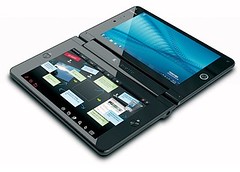
The most innovative device of this year has been released to the market for just $1100: The Toshiba Libretto W100. The W100 is using Windows 7, to me the only OS capable of using efficiently the dual touch screen installed in this Netbook.
Thursday, July 08, 2010
Best Windows 7 Downloads
PC World and PC Magazine were two of my favorite magazines long time ago. But both reached a moment when the amount of publicity was more than the amount of good articles. On top of that, few articles published about Tablet PCs and UMPC were enough to make me cancel my subscriptions and start reading more web materials. I went green. But in the last few days I have found some articles posted at PC World that I found very good. Later on I'll post about them but Today here is the link to the list of the Best Windows 7 Downloads.
Wednesday, January 13, 2010
Speed up Windows 7

Microsoft Windows 7 is already a much more responsive operating system than its predecessors, but there are tweaks and changes you can make to speed up Windows 7 even more. By reading this list and implementing some of the suggestions, you can increase performance in a very short period of time. If you have any further suggestions on how to improve the speed of a Windows 7 PC, please let us know in the comments section so that we can keep updating this list.
Monday, January 04, 2010
Windows 7 God Mode
This is one of the best hacks or tricks that I have seen in a long time. Coming from JKontheRun the trick allows you to have all the options to control your PC with Windows 7 in one folder. Is not that cool?
God Mode is easy to set up too, just do this:
- Create a new folder anywhere.
- Rename the folder by pasting this name exactly as it appears (copy it first):
- GodMode.{ED7BA470-8E54-465E-825C-99712043E01C}
Friday, October 23, 2009
XP to W7 and Apple TV commercials
Lets start with one of the TV commercials released by Apple yesterday talking about the release of Windows 7.
Pathetic. That’s the word that came to my mind after I saw the 3 commercials. The first one was talking about Microsoft promising a new OS without bugs and I have to say that that was the stupidest of all 3 because Snow Leopard has been the buggiest of all the releases of Mac OS X. How can Apple talk about bugs when they have not removed yet all the “fleas” from their own spotted animal.
But anyway, lets go back to this video. The migration path from Windows XP to Windows 7. How many times we have said and all my fellow IT friends have said that a clean install is better than an upgrade? Millions. Now this is where the whole thing fails. Everybody does not know about Windows Easy Transfer. This program makes a backup of all your documents, emails, programs configurations, etc, from your old XP and restore it back in your Windows 7 installation. Simple like that. After that all you have to do is reinstall your programs. Windows Easy Transfer is a freeware that comes pre installed in Vista and Windows 7 and can be downloaded for XP at Microsoft.
Now, I won’t lie to you, this is where the thing becomes a really mess if you are not a very organized person and you do not keep track of your serial numbers. But come on! You can’t blame on Microsoft for your own problems. You have paid for most of those programs, that’s like an investment so you should keep or your serial organized in a document kept in a CD or somewhere safe.
I understand that many people buy pre configured computers because they are afraid of installing anything. For those people the message is simple. Do not be afraid. All those big programs have a Setup Wizard that guides you during the whole installation process. Every thing is easier than what you think. A lot easier than switching to Apple, a new completely world for you. And a closed world I should say. A word where everything comes from Apple and should be approved by Apple, in a single word, a Dictatorship . What are you going to do with your freedom of choosing from millions of programs every time that you want to buy a program? Or… what you are going to do when you want to find a freeware for something that you want to do and you find that there are not that many options in the Apple World. And let’s not talk about games!
I’ll tell you how you are going to end. You will end like the 85% of the Mac users out there that still have a PC or have installed Windows in their Macs in a sort of virtual machine.
This commercial like all the other commercials of this series is just a lie. And if you think that I’m too rude when I said that let me rectify. The commercial is not reflecting the reality. The switch from XP to Apple is not a lot easier than switching to Apple. Oh, by the way, where is the part in the commercial that says that Apple does not allow you to install Mac OS X in your PC and that means that all your hardware investment is useless and you will have to buy Macs that is a lot more expensive than your current PCs.
The next time that you see on of these commercials from Apple in your TV remember me. They are the last thing that you can use as a reference or research if you are seriously thinking about to switch from Windows to Mac. I have not seen one in the last few years reflecting the reality in any grade.
Friday, September 11, 2009
Wednesday, September 09, 2009
70 Windows 7 tips and tricks
At Gnoted.com I found an excellent article about 70 tips or tricks that will make your life a lot easier in Windows 7.
Windows 7… …comes with a lot of new features. Unfortunately, some of them aren’t so easy to figure out, so I created a list of the most important tips and tricks and a step-by-step guide that will help you apply all of these great tips and tricks.
Saturday, August 29, 2009
The mysterious case of my PC waking up by itself from Hibernation
Since I installed Windows 7 Ultimate my P1610 was waking up from Hibernation by itself every morning at 8:05 AM. After few hours of research in the web I found that the cause of the problem was Media Center. The problem is that most of time at that time my P1610 is in it's case and without a proper ventilation it was getting extremely hot. Something really no good for the CPU. The solution, in the device manager, task scheduler (see picture).

Unchecking the option to Wake the Computers to run this task, probably is enough to fix this issue. In my case I'm not recording anything in Media Center, so I disabled the task. A drastic decision that put end to the Mystery that was jeopardizing the integrity of my lovely P1610. 
Thursday, August 13, 2009
Paint .NET using DirectWrite
If you don’t have the money to buy Adobe Photo Shop then you will be happy to know that Paint .NET is free and an excellent tool capable of replacing Photo Shop in most of the tasks. Today I read at Windows Experience Blog that the latest version of this tool started to use DirectWrite, the latest update in the DirectX family.
DirectWrite is one of the new additions to the DirectX family of APIs in Windows 7. DirectWrite enables better readability, adds support for a large variety of languages and scripts, and in conjunction with Direct2D provides superior rendering performance for Windows applications. Applications can also use DirectWrite with GDI and carry forward existing investments in the Win32 code base. You can read more about DirectWrite here.

Tuesday, August 11, 2009
W7: Upgrade vs Clean Install
This weekend I downloaded W7 RTM and decided to install it in my P1610. I had it before installed in that machine in a second partition and I installed multiple builds always starting from 0. The whole process always took me from 45 to less than 1 hour. With the RTM I decided to upgrade my first partition where I had Vista installed. I had a lot of programs installed there so I thought that the upgrade was going to be quicker than reinstalling everything. I was wrong. The upgrade process took more than 5 hours. After that I discovered that for some reason all the USB Devices were not working because the drivers for them were not installed properly, something that never happened before in my clean installs. Another 5 hours went into the process of finding what was causing the problem. PortShooter, a program created by Fujitsu to protect your laptop from people using the USB ports to copy stuff out of it was causing the issue. The worse thing, this program can’t be uninstalled if you do not go into the program typing a password and select the option for Uninstalling. Even worse, that password for some reason did not work anymore in W7. I had to uninstall manually the program editing the registry and deleting everything relative to the program and all changes made by the program in all the USB drivers configuration keys.
Summarizing, a clean install would have saved me time. Another thing to point. For some reason, I feel that W7 is not as responsive as when I had it in my second partition where I always did a clean install. One of the reason for this is because some of the hacks that I applied to Vista to speed up the system do not work well in W7. I have undone them but still, my upgrade still not at the level I wanted. But I’m too lazy (and I like to be challenged) so I’ll keep digging looking for what to do to make W7 as responsive as it was in a clean install.
Tuesday, May 05, 2009
Windows 7 Release Candidate ready for download
Yeap, you have a whole year to use it for free and decide if you are going to pay for the update to this beautiful version of Windows OS. The RC is the closest thing to the RTM Version, from now one we wont see any new features added but bug fixed. The RC can be downloaded in 5 different languages from here.
Welcome to Windows 7 Release Candidate (RC) testing. We're on our way to Windows 7, and if you like trying out pre-release software, now’s your chance. You get to see what's coming, and we get to see if our changes and fixes from the Beta testing are working correctly.
Monday, May 04, 2009
W7 RC: Ready for the market
I installed this weekend W7 RC. A clean install in my 15 Gb test partition and ending with around 5 Gb free. In 2 hours I was answering emails and working. Even when Fujitsu has not released any drivers for W7 for the P1610 series, more or less I have everything working (the screen does not rotate automatically when I rotate the display to tablet mode).
I'm really happy with this release. It seems strong, well made. It seems a product ready to hit the market so I would not be surprised if I see it released in this Summer.
Thursday, March 26, 2009
Touch Gestures in W7
Here is one of those videos that everybody likes.
So far, there is not any other Computer Operating System out there with better support for touch.
Monday, March 16, 2009
Windows 7 Taskbar vs Mac OS X's Dock
I'm not a Mac user so I can't give a fair opinion on this one but apparently Gizmodo Australia can ad they say that the task bar from Windows 7 is a lot better than MacOS's Dock.
The challenge of learning a totally new Windows behaviour is the cost of getting this huge step forward in UI. The superbar makes Windows way more conducive to running tons of applications, since it's actually possible to find apps and precisely the window you want in a second, no matter how bad the shitstorm on your desktop is. In this sense, it's a better application manager than the Dock, from which, generally speaking, you can't do much more than jump to open applications or close them.
Giz Explains: Why the Windows 7 Taskbar Beats Mac OS X's Dock - Gizmodo Australia
Thursday, February 19, 2009
Windows 7 RC1 on February 27?
According to a note published today at MSFN, Microsoft finalized the beta stage for Windows 7 and is currently working in the Release Candidate 1. According to the same note we could probably see the RC1 released as soon as February 27.
The build string is indeed "7048.winmain_win7rc1.090211-1625," and it tells us much more than just than the fact that it was compiled on February 11, at 4:25PM (a week ago). What makes this build significant is not only that it's the first build (that we know of) compiled in February, or that it's the first 704x build we can confirm, but the inclusion of "rc1" in the string. This suggests that Microsoft has finished with beta builds and is now working on the RC1 branch builds.
I really don’t know up to what point all this is real but I can say that Microsoft has been working in W7 with a speed that I never have seen before. So it would not surprise me at all if we begin March testing the RC1 and have by the end of June the RTM released.
Thursday, February 12, 2009
Teach Spanish to your recognizer
Speaking in English Tablet PC owners are lucky. We have been using the best handwriting recognition software available in the market for two years. In two years we have been able to train our TabletPCs to recognize virtually 99.99% of the time what ever we “draw” in our TIP. But the rest of the owners speaking other languages do not have this option available. The recognition is there and it’s good but there is not any way to train (personalize) it to be better.
Well apparently this is going to change with W7.
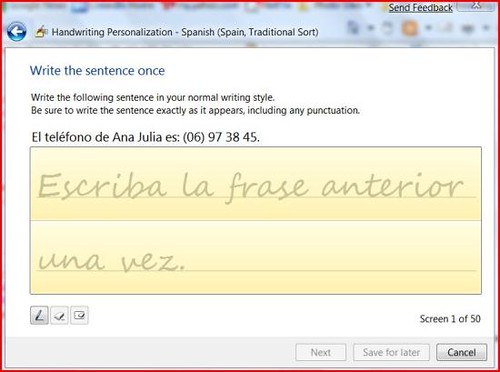
The handwriting personalization seems that will be available for other languages! That’s a real good news. Like many of you may know I live in a dual world writing in two languages and it was always sad for me to experience the difference between both recognitions, English and Spanish. Thanks to the personalization available in my English recognizer the recognition on this one was almost perfect but every time I had to write in Spanish I suffered seeing that the recognition % was not the same due to the lack of personalization in this other language. With W7 this has changed! I hope that this feature stays up to RTM version! Are you listening Microsoft!
Wednesday, February 11, 2009
W7 in my P1610 – Update
The tdx.sys BSOD that I was getting after installing any AntiVirus went away after installing build 7022. Now the system is working stable so far. The tdx.sys BSOD continues. I found that it happens if I have a network drive mapped and an Antivirus installed.
The automatic screen rotation is not working and the auto turn on when you open the PC is not working. All the rest is working.
About the alignment of the touch screen. Right after the installation you will find that the pen is off for a few millimeters close to the borders. Go to Windows Update, download the latest Intel Graphic Drivers. Once they are installed, do a reboot. After that go to Control Panel/Tablet PC Settings and use the calibration button in there.
After the installation I prepared a folder with all the drivers for Vista. I went to my Device Manager and there where two unknown devices. One of them was the Authentec Fingerprint reader. I installed the driver for Vista and W7 detected an error, after checking for a solution in the web it pointed me to this W7 Beta Driver. After that I did a right click in the second unknown device when to update driver and selected the option to search in my HDD, pointing the search to that folder where I had all my Vista drivers. The search ended with a Fujitsu driver installed.
I also imported this registry file to add 4 point rotation to Intel Drivers but I have to confess that I did not check if it was needed or not.
One bad news. Readyboost is not longer working in my SDHC. I’ll have to spend a little more time on this point tonight.
So I’m a happy camper again with W7 in my P1610.
Tuesday, February 10, 2009
One good news for P1610 Owners using W7
I noticed yesterday that W7 installed it own driver for the SD Drive and apparently is allowing me to use my SDHC Card for Readyboost! In Vista the speed test was not good enough for that task and now it’s!
W7 BSOD relative to tdx.sys
Like I said yesterday, I have finally W7 installed in my P1610. But… I have been suffering some BSOD talking about tdx.sys. Apparently many other testers have suffered the same problem. It seems to be relative with AV software and the network driver.
I’ll play around tonight with both, the driver and the AV to see if I can finally have my P1610 stabilized.
Subscribe to:
Posts (Atom)