"The only way to be truly satisfied, is to do what you believe is great work. And the only way to do great work is to love what you do." Steve Jobs
Once "inking" gets into your veins you will never be able to live without it. Frank J. Garcia

Showing posts with label Ink. Show all posts

Monday, July 12, 2010

ritePen 4.0 released

ritePen is one of the best ink recognition software available for Tablet PCs.  The beigest difference between this software and other of its kindis the fact that ritePen uses the whole screen as board. Check this video and you will see what I'm saying.

ritePen’s core functionality is that of handwriting recognition, customizable with your own lexicons and special punctuation. Write anywhere on the screen and your words are turned into text in the text-entry field of whatever app you have open. Need to enter text in a web site? Just start writing. Built on top of that are ink macros that are shortcuts triggered by writing a word then circling it. Have a standard chunk of text you need to enter? Scribble and circle one word to make it appear. Want to launch a URL or app with one word? You can do that too. In addition to all that, ritePen is a screen grabbing machine that lets you select any section of the screen, annotate and highlight with ink and shapes, and save them to clipboard or Evernote.

Via: GottaBeMobile

Thursday, June 17, 2010

Where is the news!?

Capture

Text: Wow! Where is the news? Many Android Phones have 512 MB of RAM!

Saturday, August 09, 2008

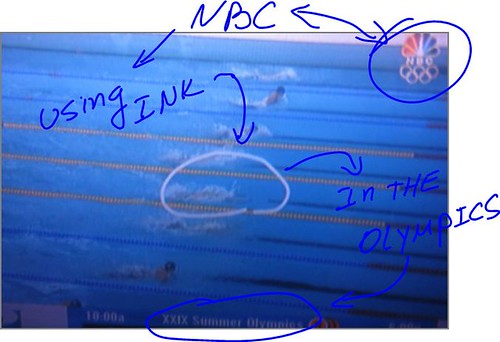
NBC using "ink" at the Olympics

Capture

The above picture shows NBC using "ink" during a swimming competition in the Olympic Games! Cool Effect!

Wednesday, February 13, 2008

Handwrite in Word, Outlook, Excel, PowerPoint even if it's the 2000 version

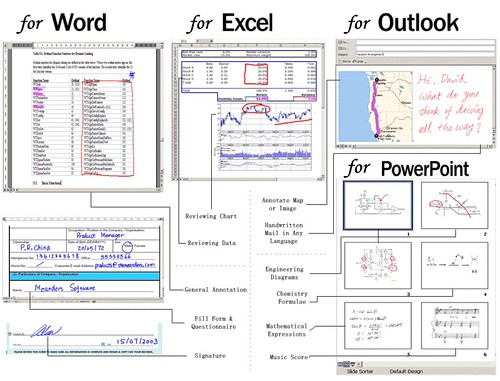
demoOne of the problems that new UMPC and Tablet PC owners find when they start to learn about all this new world of "ink" is that Microsoft started to support "ink" in Office 2003. So if you have Office 2000 you can't enjoy this feature in your Tablet PC or UMPC. There is also the case of new UMPCs like the Everun and the Wibrain that are sold with Windows XP Home Edition which does not include any of the Tablet PC functions, in this case there is not way you can annotate your office documents unless you use... Meanders' Annotator for Microsoft Office.

Meanders' Annotator for Microsoft Office enables you to write directly in Microsoft Office (97/2000/XP/2003/2007) documents with its intuitive ink and handwriting support. You can review, comment on documents, draw and annotate tables, charts, diagrams, etc inside Microsoft Word, Microsoft Excel, Microsoft PowerPoint all with your handwritten ink. You can also write and sign handwritten messages in any language inside Microsoft Outlook# when using Microsoft Word as your e-mail editor. All documents will be saved in their respective native Office file format and can be shared immediately without any compatibility problem.

I have to say that I just tested it in my Windows XP PRO at work using a Wacom Digitizer and I'm really impressed. You can get using this software virtually everything you get in Office 2007 in a Tablet PC for less than 20 dollars, no matter what version of Office or what Operating System are you using.

Saturday, May 26, 2007

Full Tablet PC Support for Sony Vaio UXs

Ultra Mobile PC Tips is all about finding solutions or workarounds for those problems or bugs left in these machines by the "Big Guys". This is why when a few days ago somebody asked me at todoUMPC for help getting full TabletPC support in the Sony Vaio UX series the fact that I do not have one did not stop me.

I had that problem before in my Q1 when the HID driver was not available. And part of the problem was fixed by changing 2 registry keys using this VBScript. But for my surprise this hack did not work in Sony UX. At todoUMPC a friend mentioned that at Micro PC Talk somebody found that installing the Wacom driver gave the UX "Partial" Tablet PC support and I said "partial" because there was not ink support in Outlook 2007 after this driver installation. Then I remembered about my VBScript and that was the final touch to fix the whole issue.

After installing the Wacom Driver and applying the VBScript the Vaio UX gained full Tablet PC functionality and full Ink support in all Office 2007 including Outlook.

The Wacom Driver does not do anything but fool Vista making it think that the unit uses a Wacom Digitizer. After installing the driver you will notice a Wacom icon in the Control Panel, but that icon does not work.

Note apart, It's unbelievable to see how a company like Sony makes such mistake. In another hand I want to thank todoUMPC guys for helping to find this solution and test it in them devices.

Thursday, May 17, 2007

InkSeine

"InkSeine is a Tablet PC application that supports active note taking by coupling a pen-and-ink interface with an in situ search facility that flows directly from a user's ink notes."


You can find more interesting videos of research done by Microsoft here. It's amazing what can be done with this application that I hope we will see soon released.