"The only way to be truly satisfied, is to do what you believe is great work. And the only way to do great work is to love what you do." Steve Jobs
Once "inking" gets into your veins you will never be able to live without it. Frank J. Garcia

Showing posts with label BenchMark. Show all posts

Friday, August 17, 2007

How fast is your processor?

Recently I have been involved in a series of discussions about performance and processors speed. And in all these discussions people use words like "slightly slower", "a little bit slower", "not that slow", but up to this moment I have not seen anybody presenting a real number, a result of a real test.

There are many benchmark programs and all of them include Processors tests but sometime they are hard to read and harder to compare the results. So I started to think about an easy way to show exactly how slow is a processor compared to another and I remembered then about a Chess program that I used back in the 80s: Fritz. That program has a benchmark option to measure how many positions a processor can calculate per second. This test only measure that and it does not depend on the memory installed or any other hardware parameter. Then somebody pointed me to this program which does that and only that, it checks how many chess positions per second any processor can calculate.

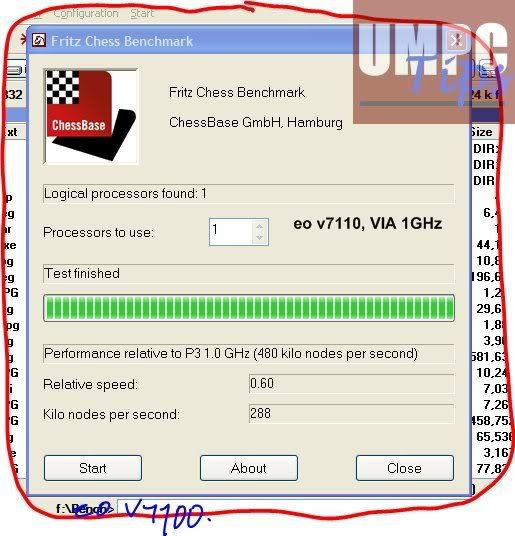
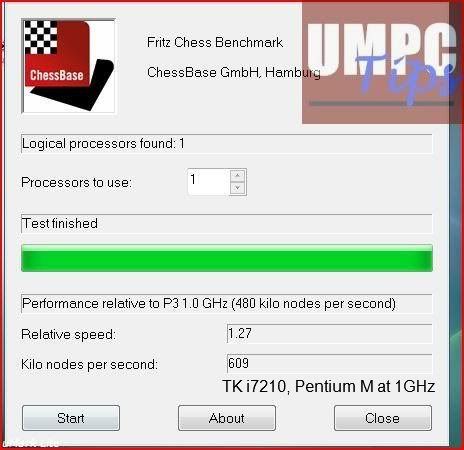
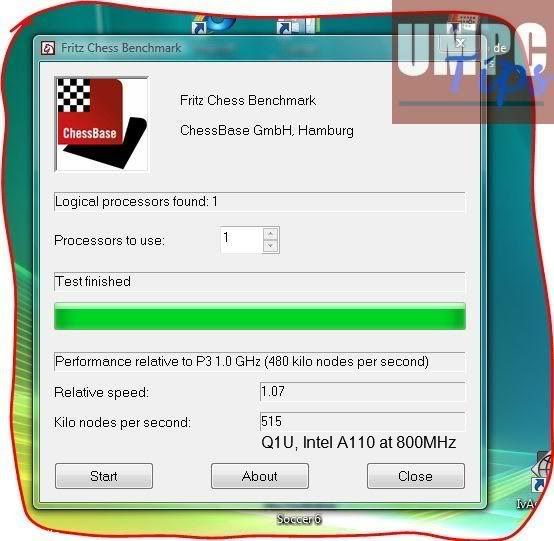
I ran the program in my both UMPCs, the eo v7110 and the Q1 Celeron and I asked a group of people to run it in Q1Us (A110) and a eo i7210 (Pentium M). I gathered all the reports and selected the best results in each case. I have to say at this point that all the results for a single device were very close one to another. And that's normal because the only thing that could may this test to have different results is the processor being used while the test was running. This means that for a higher score you had to be sure that there was not any program using the processor at that time. That's all.

So here are the screen shots of the results that I have selected.
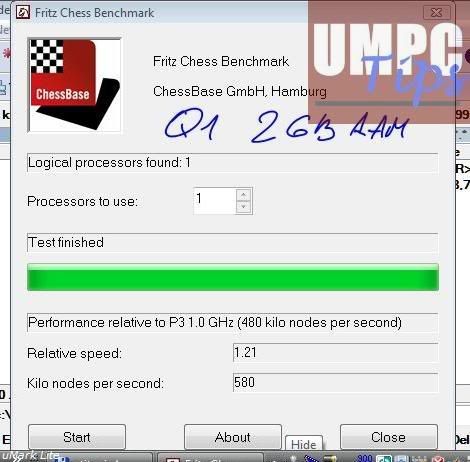
Photobucket - Video and Image Hosting

Photobucket - Video and Image Hosting

Photobucket - Video and Image Hosting

Photobucket - Video and Image Hosting

I have prepared a little table with these results and some calculations.
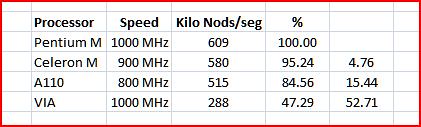
table

The column in the right shows how slow is any Processor compared to a Pentium M running at 1000 MHz used in the first generation of UMPCs.

This could be not the best way to test how good is a processor but at least is one of the simplest one I have found. If you know of any other method I'll be glad to test it and gather again all this information just to have real numbers to compare each processor.

Technorati Tags:

[Discuss This Topic]

Tuesday, August 14, 2007

Screen Resolution versus Performance

When you do what I do,  evangelize, you have people that believes you and you have people who does not believe you. And that's ok with me. Today I wrote a note about a post of James' Kendrick where I said:

For example, the 945 Graphic Chipset is not really a lot better than the 915 and you have it running at 1024x600 while the old devices using the 915 were using 800x480. So what ever that chipset added in performance to the new generation is gone because of this higher resolution. So from the point of view of graphics both generations are almost at the same level.

The higher the resolution is the higher is the processing power needed by the graphic chipset. That's something mathematical. So, if you have two graphic chips, one better than another but the better one is running at a higher the resolution that the less powerful one, from the point of view of performance you may see both at the same level. So far, I do not see anything hard to understand on this.

Well apparently, somebody at Origami Project thinks that I'm wrong.

lastly... ctitanic,your argument about the graphic card.....priceless!!

you won a gallifante!

sigue asi campeoon :)

Before I continue, let me translate the last two sentences. A "Gallifante"  was a little doll created by Miquel Obiols and it was the main prize of a Spanish Television program for kids in the 80s. The last sentence translate: "keep going champion."

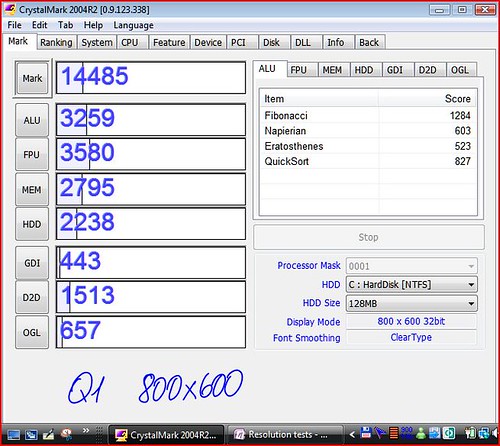
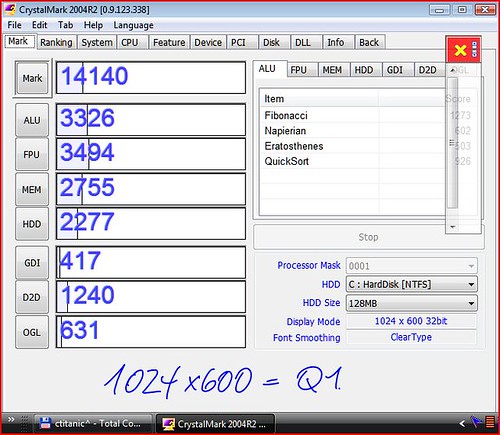
Well, to my Spanish friend, here are 3 tests I ran at different resolutions in the same machine:

Test 1 at 800x480

Capture

At 800x600

880x600Q1

At 1024x600

Q1-1024x600

As it can be seen from these tests, the resolution does not affect how the CPU works but it does affect the video chipset performance.

Like I said to my Spanish "friend'':

Sigue así campeón! Cuesta abajo y sin frenos!

Translation: keep going champion! keep going down of the hill and without breaks! Tongue out

Technorati Tags:

 [Discuss this News]

Wednesday, May 02, 2007

Q1 Ultra in numbers

Big expectations are usually the cause of big frustrations, and if you don't think so, go back a year and remember the unusual marketing campaign of Microsoft for the UMPC aka Origami devices. When the press found that Hallo was not going to work in these devices they started to categorize them as weak machines and the next big Microsoft Fiasco.

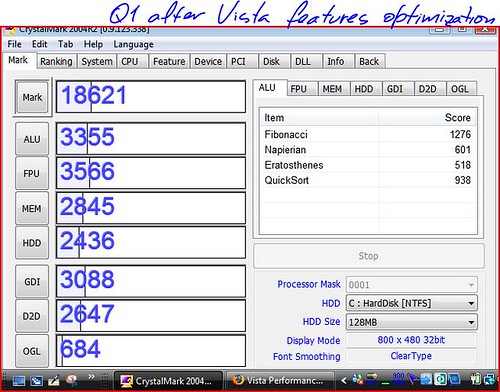
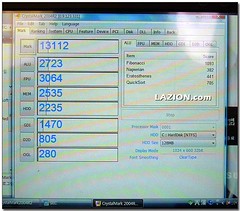
Now I see a lot of expectations around the Samsung Q1 Ultra and I'm afraid that we are going to see the same amount of frustration in a lot of users willing to pay for this device. And this is why, the next picture shows the scores of CrystalMark ran in a Samsung Q1 Ultra using the Intel new processor A110 at 800MHz.

2007-05-02_144516_download1

A Total Score of 13112, remember this number because we are going to need it later.

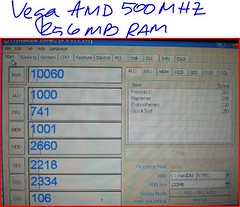
At home I have at this moment 3 UMPCs with 3 different processors: Samsung Q1 using a Intel Celeron at 900 MHz, a TabletKiosk eo v7110 using a VIA C7 at 1GHz and a Vega using a AMD Geodo at 500 MHz. The first two UMPC with 1 GB of RAM while Vega has only 256 MB. I ran the same benchmark tool in these 3 machines and here are the results.

Vega
Vega


10060 Total Score. Play attention to the last 3 tests that are graphic tests. Vega has better results in 2 of them. And that's the feeling I have when I use the Vega, the performance of 2D graphics is in this device extremely good. The Ultra perform better in the CPU tests and memory, but in this last one you have to keep in mind that the Vega has only 256 MB of RAM. So Vega is 1000 point short in this benchmark just because of the RAM.

TabletKiosk eo v7110

eo

14002! But do not run into quick conclusions. This eo is not the regular eo, this eo is using a HDD at 7200 RPM and this increases the Total Score in around 2200 points. So if we want to be fair we should or could take from these 14002 that amount and we will end with a Total Score of 11802. But even with this adjustment the eo v7110 is very close to the Q1 Ultra Score. The eo has a extremely low score in the 3D Graphics test.

Q1 Celeron

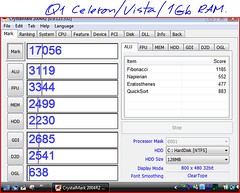
Q1

Total Score of 17056. The Intel Celeron performs a little bit better than the new A110. Probably the A110 will have a better battery life but at this moment I have not found any tests that could prove that. In the 3 Graphics Tests the Q1 performs better in this benchmark than the Q1U. Is this a mistake? Lets check this other screen shot taken in that same Q1U.

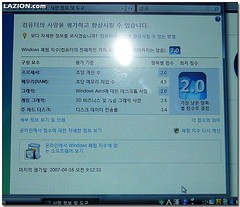
2007-05-02_144533_download

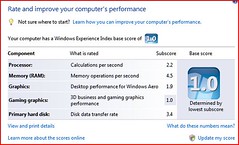
And here is the same screen shot just taken from my Samsung Q1 with Vista installed.

Capture

As you can see from these two last screen shot, Vista also finds that the Celeron Processor is faster than the A110. Also, it's interesting to see how the Aero Graphics tests shows that the 945 gets a 2.0 while the 915 used in my Q1 gets a 1.9, so, is it real that we can't run Aero in our devices? We know for fact that in the earlier beta of Vista, beta testers used Aero in their machines with the 915 graphic chip. In the Graphics department the Q1U has a better Vista Score in the test relative with Game performance, and thanks to this better score the Vista Score in the Q1U is higher. But in the real life where 3D graphics are not used that much both machines will perform at the same level.

Conclusion

From all these tests and scores I can conclude that the overall performance of the Q1U will be about the same or a little bit better in a few tasks than the one we see in current Q1 and Q1p. The Q1U is not that fast ultra powerful machine that many have imagined. And I do not think that this was the idea behind the Q1U design. The idea behind using the A110 in the Q1 is or was in my opinion to get the Aero running in a UMPC and at the same time keep the battery life the same or higher and to do that they had to create a weaker processor. And that's what the A110 processor is, a weaker processor with a better graphic chip to keep the power consumption low. But not that low. I'm not expecting to see in the Q1U 5 hours of battery life using the original battery. We are not that good yet.

CrystalMark Benchmark

Crystalmark is a benchmark tool that can be downloaded here. I did not know about this program until today when it was mentioned by Chippy when he was talking today about the Korean Q1 Ultra review.

In that review they ran CrytalMark in that device getting a score of 13112. When I get home today I'll run this benchmak in my Q1 and eo v7110, and in the Vega UMPC to compare the results.