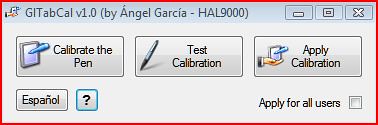
Sometimes the logon screen of some UMPCs and even Tablet PCs is not calibrated making very difficult to use if you do not have an integrated keyboard. Well from the todoUMPC team comes the solution! Angel Garcia member of todoUMPC team has created a tool that allows users with this problem to calibrate the logon screen in XP and Vista.
GlTabCal stands for Global Tablet Calibration, after the name of TabCal utility included with the OS. GlTabCal is an utility which allows to export the user’s pen calibration to make it applicable to the computer itself, that way fixing the calibration problem sometimes noticed on the Windows logon screen that makes almost impossible to type the password by touching with the pen on the virtual keyboard. If your computer doesn’t present this calibration problem in the logon screen, then you don’t need GlTabCal.
This utility was created after I discovered, researching by myself, the way to apply a global calibration for the computer, when the user haven’t logged on yet. My interest was because I owned an Amtek T700 UMPC which presented this problem. That way of fixing was published for the first time on the www.todoumpc.com users community, where it was published this utility too, in order to make things easier, saving the user from editing the Windows registry by hand, and at the same time allowing to apply the fix for Windows XP TabletPC Edition and for Windows Vista.
The tool can be downloaded here.