Windows 7 has been released and Microsoft had ready for this release two modules of Media Center: Internet TV and Neflix. I really impressed with Netflix, the player made in silverlight works perfectly adjusting the streaming to whatever download speed you have from your Internet provider, and it does it during the playback. So you notice when you start a movie how the quality goes up after a few seconds of playing (I’m using a 12 mbps service). The HD still no there but the quality that I’m getting in movies and some series available in HD is fantastic. The Netflix software for 7MC was very well designed. Basically, you don’t need to visit Netflix website to manage anymore your queue. You can search for movies and the navigation options during the playback are compatible with MC Remotes.
Monday, October 26, 2009


Monday, October 12, 2009
Playing DVIX in 7MC
No, this is not a “how to” note or anything like that. Windows Media Center for me is something completely new. I have been using UMPCs and Tablet PCs for the last 3 years and on them this program does not work to well so I never tried. And probably that’s the best thing that happened to me because my first encounter with MC has been with 7MC or Windows 7 Media Center. A version of MC totally renovated by Microsoft. Sponsored by Ruvo, I will be shooting short videos of 7MC showing how easy is to use this program and different options that you can enjoy on it. The first video of this series shows how easy is to navigate using a Microsoft MC Remote Control and play a DIVX file stored in the HDD.
Monday, October 05, 2009
Does the nVidia ION really help?
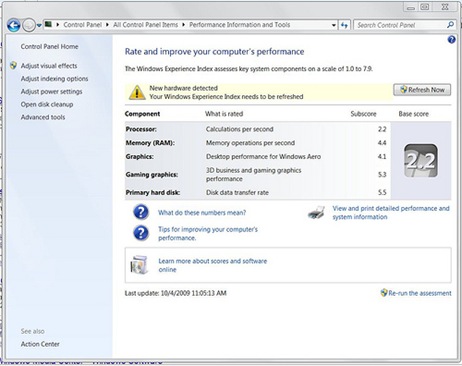
We have seen lately some hardware makers switch from the Intel video chips or the SIS graphic chips to the nVidia ION and some of you have asked if that helps. I’m currently testing the Ruvo Mini Cap 7 but using the nVidia ION Graphic Chip instead of the SIS 672 and the next two pictures show how the W7 graphic scores changed depending on what chip the device was using.
Using the nVidia ION
And the next one is using the SIS 672

A noticeable difference.
Sunday, September 27, 2009
Installing W7 in a Ruvo MiniCap 7 using a nVidia ION

As you may recall I already had the chance of checking the version of this machine using a SIS graphic chip which was Ok but never up to the level of the one I'm currently checking. The facts that it uses a HDMI port to connect to your TV,an ION chip from nVidia that can handle 1080P without any problem and a size that allows you to perfectly hide it in anywhere makes this the perfect Media Center.
The installation of W7 in the Ruvo MiniCap 7 took a little more them 45 minutes. A total of 53 minutes counting 2 optional downloads for the nVidia chip. Tip: After running Windows Update, you will find an unknown device in the Device Manager, click on driver update and point the search to the CD that came with the device.
My first impressions? The ION chip is the way to go!
You can see playing different video files in this video.
Thursday, August 20, 2009
Lenovo releasing new mini PC
Should I say new? No really, let’s check the picture posted at Lenovo’s website and compare it with another device I was lucky enough to review:
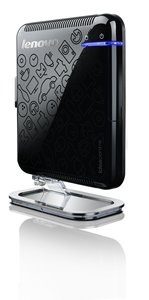 |  |
| From Lenovo’s Page | Ruvo Mini Cap 7 |
Ultra-slim, space-saving mini PC. Fits anywhere-table, living room or even the kitchen counter. Pair it with your TV to output to larger a screen and watch videos or play games.
Lenovo used to be an IBM company that made and designed their own machine. Lately (After it was bought by a Chinese based company) I have experienced issues in their machines and now I found that they are just rebranding machines made by somebody else.
BTW, I just received a second version of the Ruvo Mini Cap 7 but this time using a different graphic chip, it’s not using the SIS and I’m expecting to see a better performance in this one.
Tuesday, June 16, 2009


Monday, June 15, 2009
Mini Cap 7, performance
I have been running some performance tests in the Ruvo Mini Cap 7. The machine out performs many of the Netbooks and UMPC currently in the market, I would say easily.
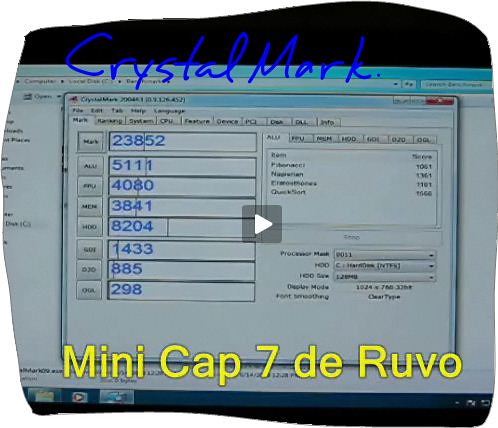
I prepared a video for todoumpc.com (Sorry guys, it's in Spanish), where I played DVD, 720p and 1080p videos and in my opinion the machine handles the DVD and the HD 720p videos really well. The HD 1080p skips frames but I think that that with some tuning, selecting a good player, good codecs and a good video format, probably it can handle too this HD format.
I also installed Ubuntu but still too early to share my impressions about this experience. The only thing that I can say is that it runs out of the box without me having to change or install anything.
Tuesday, June 09, 2009
Mini Cap 7, second round
I installed today W7 in this device from Ruvo. I suspect that this demo unit has a SSD because W7 installation went super fast, less than 20 minutes. All drivers were working right after the installation, the only one with some issues was the Sound one, but after installing the provided driver for Vista everything was working fine.
I going to start running some tests later but here is the first one for those that have been asking. W7 Performance score.
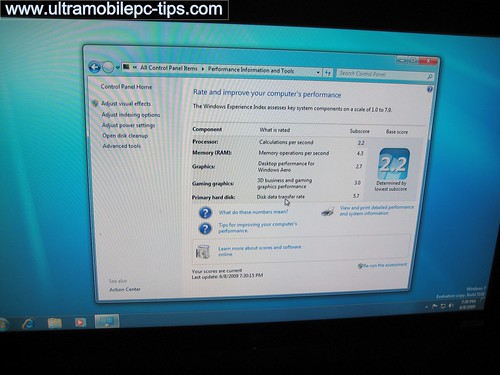
Here is the same screen taken from my Fujitsu P1610 that can be used as reference.
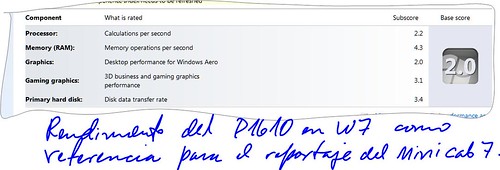
Without any doubt, the Mini Cap 7 performs a little bit better than the P1610.
The Mini Cap 7 can be ordered at todoumpc.
Saturday, June 06, 2009
Mini Cap 7
The Mini Cap 7 is a new product from Ruvo. One of the smallest desktop PC I have ever had a chance to work with. I just received a demo unit and this is a photo review of it and first Impressions: Small, very refined design that reminds me Apple's products. It comes without connection cables, I really did not like this, and without OS installed something that I really don't care because it gives me the opportunity to fully play with this device that can be found already for sale here.


Tuesday, December 11, 2007
The Avox in pictures
As usual with any UMPC that I'm reviewing, here is the set of pictures that I have prepared for the Avox from Ruvo.


Friday, December 07, 2007
Gigabyte U60, the inner secrets
For the first time, at least that I know of, pictures of a opened Gigabyte U60 (AKA Avox, Ahtec X60GT, Medion, etc) have been published in the web, and that's thanks to todoUMPC.com where the bad guys wanted to see exactly what was inside of this UMPC and what were the upgrade possibilities on this device.
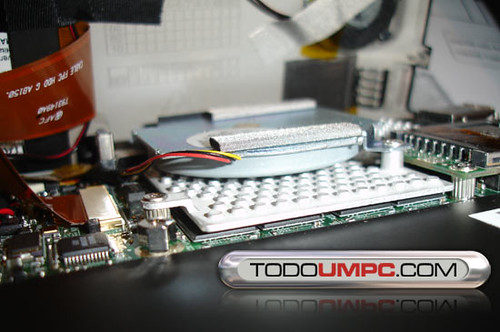
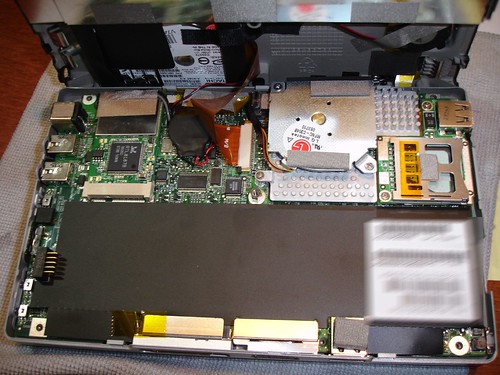
In the first picture you can see the fan from LG and part of the isolation on covering the processor and the memory ships attached to the motherboard. The fan and isolation partially explains why this is the cooler VIA that I have tested so far.