The preorder page is running and those who subscribed to receive a notice received an email about this change.
Big surprise, the cheapest price was not $299, we all were expecting that, but I was not $350, the sweet spot for many, and neither it was $399 which was the most realist starting point for most of the analyst and my own opinion. So I'm disappointed with this fact. The starting price is $499 for the 32Gb version without the Touch Cover. Another disappointment is that if you want to buy the combo of Tablet and Touch Cover then you are stuck with a black color cover. Otherwise, you need to pay $499 for the Tablet and add the cover for $119. Twenty dollars more.
The 64Gb version is sold with the Touch Pad so that forces you to pay $699! An option of that same Tablet without the Touch Cover for $599 would have been great and the one I would have picked instead of paying that amount for 32Gb with a Black Touch Pad, the one I ended preordering.
Well, the fact that this is not an iPad so it does have a microSDXC reader makes me feel a little bit better so I ordered one of this 64Gb memory cards at Amazon. The fact that being a Microsoft Tablet with a File Explorer makes me confident that I will be able to manage the storage space moving everything I can or do not use often to that memory card and still have it available when I need it. Finally I can have my files organized how I like and no how Steve Job liked.
Another point that I did not like is that the battery life according to Microsoft page is about 8 hours of "Mixed Activity". Hum... Mixed Activity is a complicated concept. Anyway, it falls lower than the 10 hours of Mixed Activity of my iPad 2. I hope that those 8 hours are not HP's Style (never close to the reality, at least in my experience).
Now, the waiting time starts. Are we going to get a tracking number Microsoft?
Showing posts with label Hardware. Show all posts
Showing posts with label Hardware. Show all posts
Tuesday, October 16, 2012


Monday, June 18, 2012
Microsoft's Surface
Microsoft has announced today Surface, a complete new hardware designed and made by this company.

There are going to be two versions, one Windows RT and one with Windows 8 Pro.

Those wanting to have Ink in the RT version are going to be disappointed, the good news is that the Pro version still have this feature and all the others that makes this version a full TabletPC.
Both version have a cover that includes a touch keyboard on it. A revolutionary concept never seen before. The whole design is new and includes a stand as part of the body.

The price and availability still unknown but we expect to find more information in the next few weeks at http://microsoft.com/surface

There are going to be two versions, one Windows RT and one with Windows 8 Pro.

Those wanting to have Ink in the RT version are going to be disappointed, the good news is that the Pro version still have this feature and all the others that makes this version a full TabletPC.
Both version have a cover that includes a touch keyboard on it. A revolutionary concept never seen before. The whole design is new and includes a stand as part of the body.

The price and availability still unknown but we expect to find more information in the next few weeks at http://microsoft.com/surface
Thursday, March 15, 2012
What would you do for an Ultrabook
There are marketing campaigns that are ingenious to call them in some way. And the ones that I love are those that becomes like a virus making everyone, including me, to contribute for free in the campaign. This is the case of these videos from Intel.
But wait! There is more! You can find more of these videos if you visit this pages
Friday, December 11, 2009
ConsumerReports’ gifts list
Consumer Reports is my favorite magazine. And now it’s more than my favorite after watching their video about what should be the electronic devices that they recommend to be included in our Holiday Gifts Lists. You will know why.
Friday, December 04, 2009
TabletPc2.com 2009 Holiday Gift Guide
Linda Epstein has published her Holiday Gift Guide for this Christmas. You may find many other guides but I'm sure that none of them will have the artistic touch that Linda gives to her. Check this picture:

This year's list includes more than 100 products from over 35 vendors. Tablet PCs, Netbook's, Laptops, All-In-One PCs, Entertainment, Accessories, iPhone, Digital Cameras, Storage Solutions and more............
Thursday, March 19, 2009
The Zypad WR1100
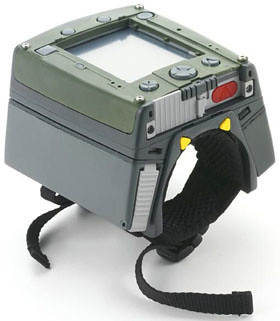 If it was not because of the processor (ARM) I could have called a Military UMPC. The Zypad can be worn in your wrist and is loaded with Linux and everything you need to survive in any conditions.
This bit of bling is a ruggedized wrist-worn personal computer designed for the bush. It contains a high performance CPU with 128MB of flash memory and 256MB of RAM.
You can find more information about it here.
Sunday, September 02, 2007
From your UMPC to your TV using a GXP 2000
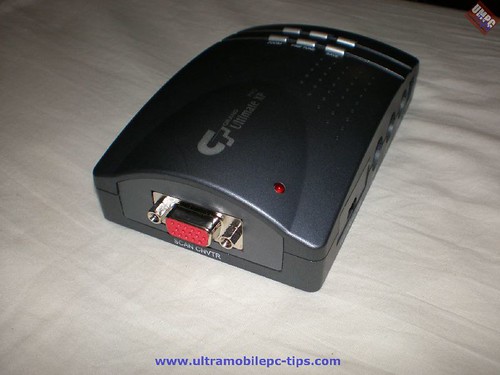 I recently had the opportunity to test the Grandtec Grand Ultimate XP GXP 2000 PC to TV converter. I have to say that while I was really impressed with how the Samsung Q1 performed in this task I was not impressed at all with this converter. It took me a long time to set it in my Toshiba HD TV 42" to get a view where I could read the letters or the screen of any opened application. In a Sanyo 22" TV was just impossible. I have to say that I tested the RCA Video connection and the S-Video but this converter has and RGB out and a Component Video out which should give better video out to your HD TV.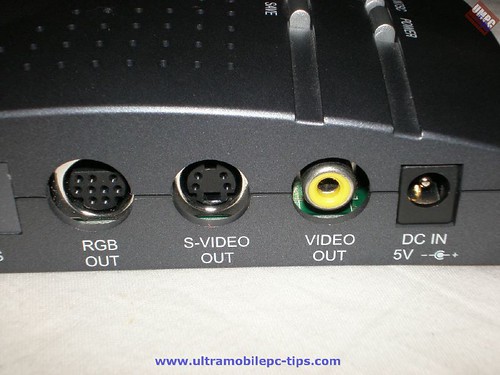
Watching video the GXP 2000 performed a lot better but the picture was not that sharp like the one I was getting in the Q1. Despite all this I decided to watch a movie this Sunday afternoon using my 15 hours per month of Instant Movies from Netflix.
The first problem was Network connectivity. I do have WiFi at home but the speed of it did not convince me for this task so I decided to use a Netgear Wall-plugged Bridge XE102. I have been using these bridges to connect my Tivo via Slingbox to my WiFi Router located in another room of my house and I'm really very pleased with them. And I was right, the Netflix player connected to a higher speed than using the Q1 WiFi Card and higher speed means better image quality.
One video clip in cases like this says more than 1000 words so here it's:
You can find more pictures of the GXP 2000 here.
Conclusion
You can find PC to TV converter in the range of $50 to $120. This one is sold for around $90. While this one performed Ok playing movies if was almost unusable reading a web page or any kind of small text. So in a scale from 1 to 10, I would give this a 6.
Technorati Tags: GXP
Wednesday, August 29, 2007
Adding Internal USB to a eo v7110
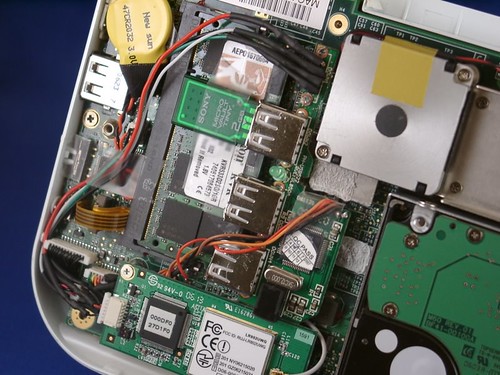
That's what Daniel did and wonderfully explained in this article. And you may think, why somebody would want to go up to these extremes. Well in this case he used one of the ports to add an extra 2 GB USB Memory drive that he is using now as a Readyboost drive!
Technorati Tags: Hacks
[Discuss This News]
Thursday, August 09, 2007
Poor v7110
I said poor v7110 because what our friend Daniel want to do to his v7110 is very close to madness.
What are they odds I can fit the thing above INSIDE my TabletKiosk eo v7110?
It'll take some solder, plastic cutting, and creativity... but it could be possible. Internal Flash storage and/or ReadyBoost. Mmmm.
Technorati Tags: UMPC
Subscribe to:
Posts (Atom)