"The only way to be truly satisfied, is to do what you believe is great work. And the only way to do great work is to love what you do." Steve Jobs
Once "inking" gets into your veins you will never be able to live without it. Frank J. Garcia

Monday, October 09, 2006

CTWarranty Released

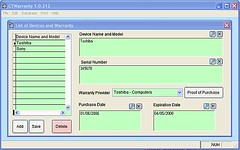
CTWarranty is a database tool that will allow you to keep track of your devices and when their warranty expires. This tool has been specially designed to fit the smaller resolution of UMPC devices but it can be used in any Tablet PC. The different entry forms of this program have been designed to support ink.

ctwarranty2

You can download the trial version of the program here. For a limited time you can buy it here at 25% OFF the regular price ($9.99), that's just $7.50

R2H partially naked

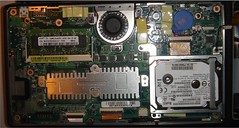
One of the OrigamiPortal users has posted a picture of his Asus R2H opened. He opened to see how the HDD can be upgraded for a bigger one.

The harddisk is connected via a flatcable that runs from the side under the disk to the motherboard connector above it.
The GPS unit is connected to the top right with a flatcable (disconnected here) and a earthing cable to one of the screws holding the harddisk.

r2hstripped

$7000 dollars for an UMPC!

Yes, according to news published today at Guizmodo, Catcher Rugged UMPC should be released mid November for a price of "only" $6999! Wow! I do not know of any Tablet PC that have reached this price!

Gottabemobile Contest

If you are looking for news about TabletPCs and UMPCs, Gottabemobile is the place to start. And if you are looking for a good forum to get help Gottabemobile just opened one. And to celebrate this big event they have organized a Contest where the prize is... a Motion LS800 Tablet PC!

Sunday, October 08, 2006

No luck with Vista in eo i7210

Seems that i7210 owners did not have the same same luck with Vista according to this report at Origami Project Forum.
  • Touch screen calibration necessary using method you describe above
  • Sound driver needed update using TabletKiosk XP Sound Max drivers.
  • Wifi Drivers were difficult to install, and lack stability.
  • SD Card does not work. Needs driver update, but no drivers to be found.
  • Screen rotation not available.
  • No other screen resolution but 800x480 is available.
  • Shutdown, Restart, suspend, and hibernate does not work. Each results in a blue screen (must be some driver problem).

I'm sure that TabletKiosk is checking these issues, after all, the i7210 is shipped with a "Vista Capable" sticker on it.

How to install Vista in an eo V7110

For those asking for details about how to get Vista Installed in a V7110 with everythingworking here is a very good guide at Darryl on Mobility.

The only difference between what he did and what I did is that I did notcreate the CMD Short Cut, I created a Short Cut to TabCal directly.

Vista RC2 installed in a V7110

I installed Vista RC2 in my eo V7110, and I'm pleased to report that every single thing is working. The touch screen driver needs to be installed from Windows Update. The WiFi drivers need to be installed from TabletKiosk drivers CD. I also installed Navpoint drivers and Amtek's drivers for the configuration of the Hardware keys.

I had to calibrate the screen creating a short cut in the desktop, in the Program Field of that short cut I typed TabCal novalidate and I used the option Run as Administrator.

I did not install the sound drivers from VIA because the default installed by RC2 seems to work fine so far.

So take note TabletKiosk, the eo V7110 is Vista Ready with just some very little details!

Saturday, October 07, 2006

BoxWave Antiglare Screen Protector Review

A few day ago I announced here and at Origami Project Forum a new review about a product that changed dramatically the way I interact with my eo v7110 and during all these days I have been giving clues of what kind of accessory I was talking about:

So what's the mysterious accessory? Tada da da! The Boxwave Antiglare Screen Protector for TabletKiosk eo v7110.
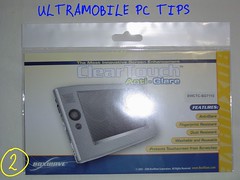
DSC00673


DSC00674

I always have considered a screen protector a "must have" accessory and at the same time one of the most difficult for me to install even when BoxWave includes a very comprehensive instructions in the back of the package.
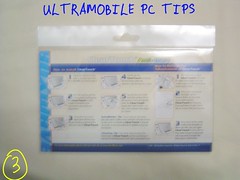
DSC00678

What's included in this package?

DSC00681

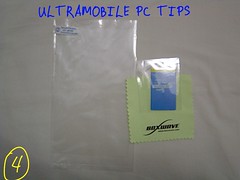
  1. The screen protector specially cut to fit the size of the UMPC screen. I bought in ebay a screen protector for 3 dollars and it was like 2 millimeters smaller than the eo screen and as a result there was a gap between the protector and the body of the eo and it was very annoying when I was scrolling pages and the stylus got into that gap. This screen protector fits perfectly.
  2. A small card needed to get the air out between the screen and the protector. Tip: Better use a Credit Card!
  3. A piece of cotton cloth.
Now, how this screen protector has dramatically changed the interaction with my eo? For two reasons:

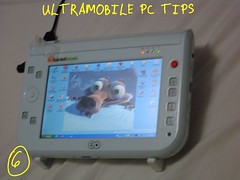
1.-It's antiglare property. There is not any way to explain this point than these two pictures:

Before
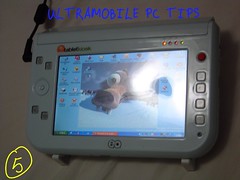


DSC00680


After


DSC00686


The glare is gone!

2.-The surface of eo screen, or any other UMPC, is very skids. This screen protector adds a different texture to the screen that feels more like paper. I have found that this new texture has improved a lote my handwriting.

These two points plus the fact that now my eo screen is protected against scratches made by particles of dust or sand falling between the screen and the stylus is what make me recommend this accessory from BoxWave to every UMPC owner. The BoxWave Antiglare Screen Protector is a really "Must Have".
Friday, October 06, 2006

Some screen shots from Vista

I read in some where that Microsoft rewrote every single line of code in Vista creating a completely new Operating System. I really don't know if this is true but one thing is for sure, many things have changed in Vista.


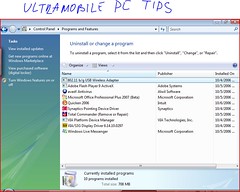
add and remove


For example, now the "Add and Remove Programs" now is called "Programs and Features"and of course, it looks a lote better.

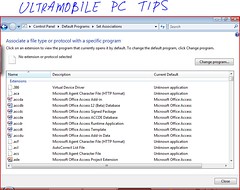
Microsoft has added a new tool to Vista just to change the file association.


Tooltochangeassociatin


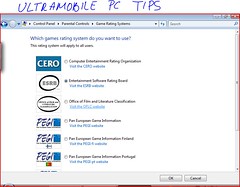
Another new feature added is a "Parental Control" tool.


Parental Control


I have been using Vista for almost two days now and Today when I switched back to XP felt like a fish out of the water.

Thursday, October 05, 2006

Vista in a v7110: First impressions

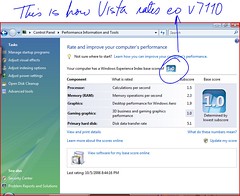
What a surprise. For some reason I always thought that Vista was going to perform very slow in a TabletKiosk eo v7110 and the reality is totally different. Vista performs a lot better than XP. And I think that part of the secret is in the new Performance Information and Tool Feature. This tool runs the first time your PC logs in Vista and it configures your PC looking for the best Performance. The following screen shot showshow this tool rated the eo v7110 aka Amtek T700.


eo score


Another big surprise is how well the new handwriting recognition works. I really believe that Vista will improve Tablet PC sales a big time.

is Vista RC1 perfect? No. For example, for some reason when I correct a word in the TIP and hit Ok, my correction is not registered. Another annoying thing is that no blanks spaces are inserted after I hit the insert button so I have to go back often just to add these spaces.

Another thing I did not like is how the security features are interrupting you with 100 questions beforeto open a simple "unsigned" program.

Well, I guess that "nobody is perfect". Microsoft has done a great Job this time and for sure I'm gonna be one of the first to update my XP copy in January..